> ## Documentation Index
> Fetch the complete documentation index at: https://liv-creators.mintlify.site/llms.txt
> Use this file to discover all available pages before exploring further.
# OBS Plugin
Our OBS Plugin, available on the "latest" branch, allows you to "Export" any scene or source to be used as your LIV camera, without any CPU overhead!
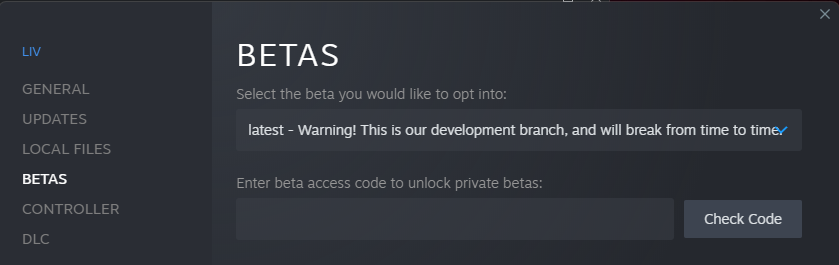
Close LIV, then go to Steam > LIV > Properties > Betas, and select "latest - Warning!" there
 You can find it in LIV's `Resources\OBS Plugin` folder, and you'll need to install it and add it to a scene/source before using it in LIV
`Program Files (x86)\Steam\steamapps\common\LIV\Resources\OBS Plugin` copy that over to `Program Files\obs-studio` and choose Replace files when prompted to do so.
If you installed OBS through Steam: `Program Files (x86)\Steam\steamapps\common\OBS Studio`
# In OBS
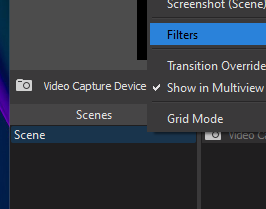
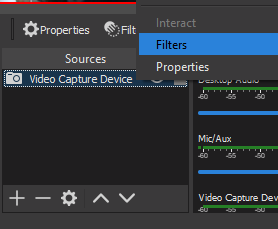
Right click the scene or source and select Filters
You can find it in LIV's `Resources\OBS Plugin` folder, and you'll need to install it and add it to a scene/source before using it in LIV
`Program Files (x86)\Steam\steamapps\common\LIV\Resources\OBS Plugin` copy that over to `Program Files\obs-studio` and choose Replace files when prompted to do so.
If you installed OBS through Steam: `Program Files (x86)\Steam\steamapps\common\OBS Studio`
# In OBS
Right click the scene or source and select Filters
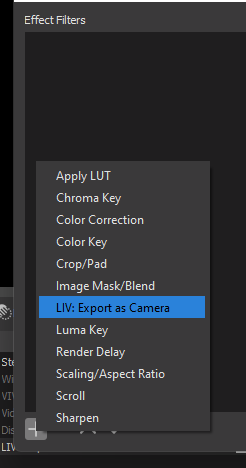
 Then click the + to select the filter LIV: Export As Camera
 # IN LIV
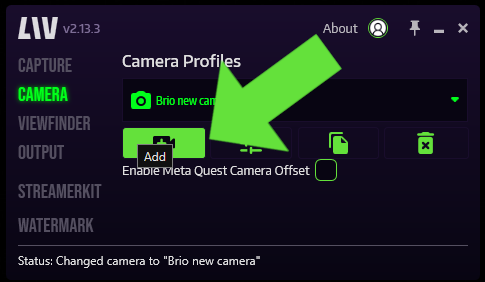
Create a new camera profile
# IN LIV
Create a new camera profile
 Select OBS Source in the Type: drop down menu
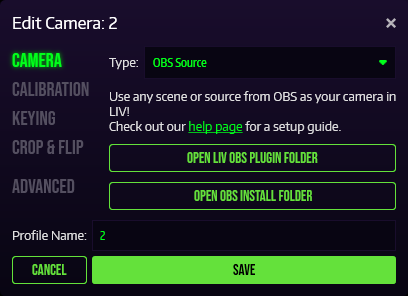 Continue on as normal from here.