> ## Documentation Index
> Fetch the complete documentation index at: https://liv-creators.mintlify.site/llms.txt
> Use this file to discover all available pages before exploring further.
# Setup a Tracked/moveable camera
Mixed Reality tracked/moveable camera
* Pair your tracker in SteamVR
* Launch the LIV desktop app **Mixed Reality Capture > Start PCVR Mixed Reality Capture**
* After creating your camera profile click **Edit > Calibration**
* In the Tracker drop down menu select your tracker
The camera must stay stationary before and during calibration.
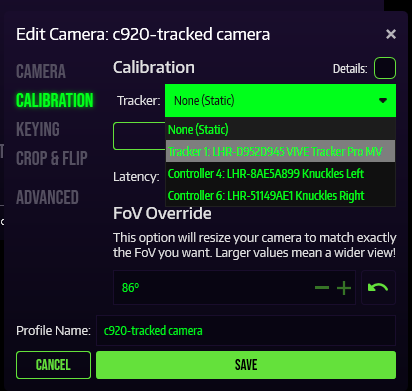 Next you can calibrate your camera as usual
**TIP**: Make sure to securely fasten the tracker and camera together, any movement will cause your calibration to mess up.
* Pairing your trackers for Full Body Tracking or tracked camera
* How to pair SteamVR devices to avoid binding conflicts
Next you can calibrate your camera as usual
**TIP**: Make sure to securely fasten the tracker and camera together, any movement will cause your calibration to mess up.
* Pairing your trackers for Full Body Tracking or tracked camera
* How to pair SteamVR devices to avoid binding conflicts