LIV Creator Documentation home page
LIV Steam App on PCVR
Search...
⌘K
Ask AI
Dashboard
Dashboard
Search...
Navigation
Rotate your play space using OVR Advanced Settings
Home
Guides
Troubleshooting
FAQ
LIV Hub
LIV Discord
Is LIV free to use?
Which HMD's does LIV support?
Can I use the LIV logo on my stream/videos/channel?
What camera resolution do I choose?
Is it currently possible to use an Android phone in place of the camera?
Can I use LIV without a camera?
What PC specifications do I need to use LIV SteamVR app?
What cameras can I use with LIV?
Rotate your play space using OVR Advanced Settings
Can I use LIV without a green screen
Rotate your play space using OVR Advanced Settings
Copy page
Copy page
Download
OVR Advanced Settings
from Steam or github.
https://store.steampowered.com/app/1009850/?snr=1\\\_5\\\_9\\\_\\\_205\
Free ->
https://github.com/OpenVR-Advanced-Settings/OpenVR-AdvancedSettings/releases\
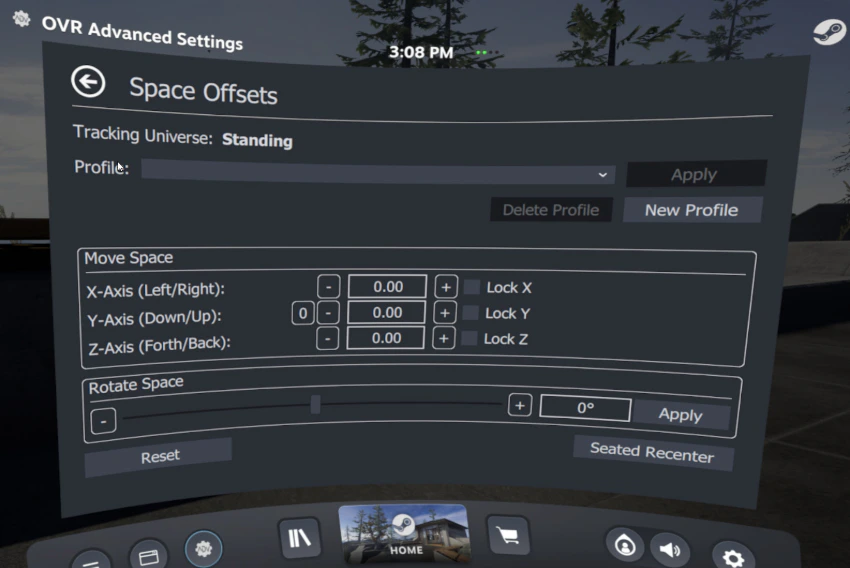
Open OVR Advanced settings and navigate to the ""
Off Sets
"" tab.
Use the slider labeled ""
Rotate Space
"" and hit Apply. It might take you a few tries to get it just right.
Quest users be aware that any time you take off the Quest, use the Quests recenter function, put the Quest asleep, etc, it will generate new coordinates and you will have to run a LIV calibration again.
Was this page helpful?
Yes
No
What cameras can I use with LIV?
Can I use LIV without a green screen
⌘I
Assistant
Responses are generated using AI and may contain mistakes.