Add or remove your streaming platform connections to YouTube, Twitch, or manual RTMP connections.You can have multiple streaming connections set up and choose which platform to stream to.
You must meet each social platform’s streaming requirements to stream. LIV will not bypass the requirements.
Setup connection
YouTube
Confirm that your YouTube is set up properly to stream. LIV doesn’t bypass YouTube’s requirements. Age: You must be at least 16 years old to live stream on your own. Channel Verification: Your channel must be verified, usually by phone number, in YouTube Studio. No Restrictions: You must not have any live streaming restrictions in the past 90 days. 24-Hour Wait: After enabling and verifying for live streaming, there is often a 24-hour waiting period before you can go live for the first time.
Verify that your YouTube account has been setup and enabled for Live Streaming. Your YouTube must be eligible in order to stream.
Sign in to YouTube and go to YouTube Studio.
Navigate to Settings, then Channel, and select Feature eligibility.
Verify that Intermediate features level 2 is enabled.
YouTube account has been enabled for at least 24 hours
Select to Connect
Select YouTube. A browser window will be opened.
Log into your YouTube account or select the YouTube account you want to stream to, if presented
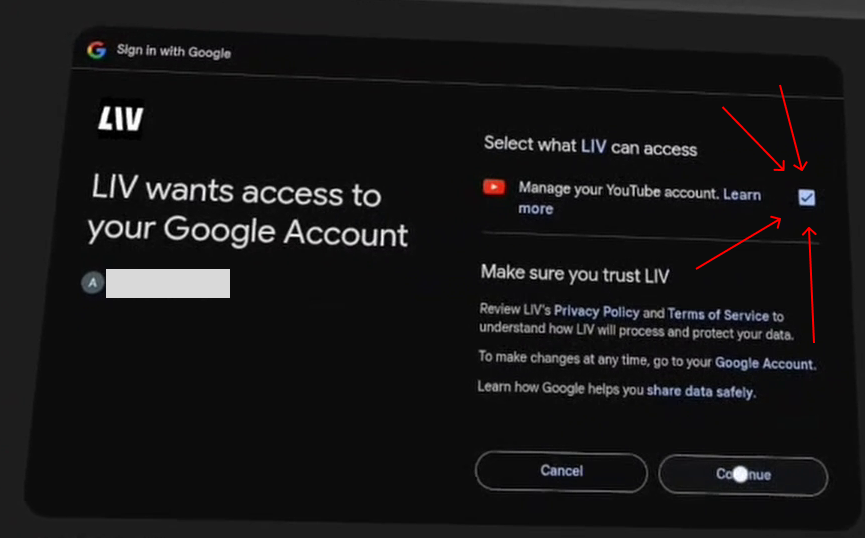
Ensure you’ve granted permission for LIV Hub to have access to your YouTube account when you connected. If you didn’t, you may have to disconnect and start again. If needed, you can reset your LIV Hub and YouTube account link at https://myaccount.google.com/connections
You’re now connected to YouTube
Twitch
Confirm that you have an eligible account with Twitch
If your streaming destination needs a stream key, enter one in the field. The stream key will be appended to the end of the RTMP URL with a / between, in the format RTMPURL/STREAMKEY.
Save your connection
RTMPS is not supported at this time.
Select an active connection
If you have multiple social platforms connected you can select which platform to stream to.We do not currently support multi-stream.You can’t switch platforms mid-stream.
Disconnect from LIV Hub app
Highlight a streaming platform and press the Disconnect prompt.Confirm the action
Was this page helpful?
{"docsConfig":{"theme":"mint","$schema":"https://mintlify.com/docs.json","name":"LIV Creator Documentation","description":"LIV Hub, LIV Camera, and LIV SteamVR app support","colors":{"primary":"#16A34A","light":"#07C983","dark":"#0F1010"},"logo":{"light":"https://mintcdn.com/liv-creators/HMPxFiX3Sh35PVht/logo/light.svg?fit=max\u0026auto=format\u0026n=HMPxFiX3Sh35PVht\u0026q=85\u0026s=e285ddf6db91f35d416f06ac03f6751b","dark":"https://mintcdn.com/liv-creators/HMPxFiX3Sh35PVht/logo/dark.svg?fit=max\u0026auto=format\u0026n=HMPxFiX3Sh35PVht\u0026q=85\u0026s=8c34aabcf559f33b42ff5a0788bb3334"},"favicon":"/favicon.png","background":{"color":{"dark":"#0F1010"}},"navbar":{"links":[],"primary":{"type":"button","label":"Dashboard","href":"https://dashboard.liv.tv/dev/login"}},"footer":{"socials":{"x":"https://twitter.com/LIV","youtube":"https://www.youtube.com/@liv","instagram":"https://www.instagram.com/liv","bluesky":"https://bsky.app/profile/liv.tv","discord":"https://liv.tv/discord","website":"https://liv.tv"}},"seo":{"indexing":"navigable"},"contextual":{"options":["copy","view","chatgpt","claude","perplexity","mcp","cursor","vscode"],"display":"header"},"styling":{"latex":false},"navigation":{"global":{"anchors":[{"anchor":"LIV Hub","icon":"vr-cardboard","href":"https://www.meta.com/en-gb/experiences/24199129276346881/"},{"anchor":"LIV Discord","icon":"discord","href":"https://discord.com/invite/liv"}]},"pages":[]}},"deployment":{"deploymentMetadataValue":{"subdomain":"liv-creators","hasAudioNarration":false,"actualSubdomain":"liv-creators","customDomains":[],"gitSource":{"type":"github","owner":"liv","repo":"liv-user-help-docs","deployBranch":"main","contentDirectory":"","isPrivate":true,"mountPath":"","label":""},"feedback":{"thumbs":true},"entitlements":{"AI_CHAT":{"status":"ENABLED"},"WEB_MCP":{"status":"ENABLED"},"NARRATION":{"status":"ENABLED"}},"buildId":"6ae94647fc206e01340adcb9:success","clientVersion":"0.0.4143","searchFilterCounts":[{"language":"default","tag":"LIV Steam App on PCVR","count":122},{"language":"default","tag":"Guides","count":98},{"language":"default","tag":"Troubleshooting","count":42},{"language":"default","tag":"LIV Hub and LIV Camera","count":38},{"language":"default","tag":"LIV Avatars and Virtual Cameras","count":31},{"language":"default","tag":"LIV Hub","count":23},{"language":"default","tag":"General LIV Steam App","count":21},{"language":"default","tag":"Mixed Reality","count":19},{"language":"default","tag":"StreamerKit","count":13},{"language":"default","tag":"FAQ","count":12}]},"assistantConfig":{"enableAskAiButton":false,"enableStarterQuestions":false,"enableAskAiSearchBar":true},"basePath":"","hasChatPermissions":true,"hasWebMcpPermissions":true,"toggles":[{"name":"kill-isr","enabled":true,"variant":{"name":"disabled","enabled":false,"feature_enabled":true},"impressionData":false},{"name":"custom-rbac-roles","enabled":true,"variant":{"name":"disabled","enabled":false,"feature_enabled":true},"impressionData":false},{"name":"agent-mintlify-slack","enabled":true,"variant":{"name":"disabled","enabled":false,"feature_enabled":true},"impressionData":false},{"name":"agent-integrations-settings","enabled":true,"variant":{"name":"disabled","enabled":false,"feature_enabled":true},"impressionData":false},{"name":"rbac-expansion","enabled":true,"variant":{"name":"disabled","enabled":false,"feature_enabled":true},"impressionData":false},{"name":"automations-pr-grouping","enabled":true,"variant":{"name":"disabled","enabled":false,"feature_enabled":true},"impressionData":false},{"name":"custom-prefix","enabled":true,"variant":{"name":"disabled","enabled":false,"feature_enabled":true},"impressionData":false},{"name":"analytics-v7","enabled":true,"variant":{"name":"disabled","enabled":false,"feature_enabled":true},"impressionData":false},{"name":"user-flows-analytics","enabled":true,"variant":{"name":"disabled","enabled":false,"feature_enabled":true},"impressionData":false},{"name":"no-publish-flow","enabled":true,"variant":{"name":"disabled","enabled":false,"feature_enabled":true},"impressionData":false},{"name":"workos-onboarding","enabled":true,"variant":{"name":"disabled","enabled":false,"feature_enabled":true},"impressionData":false},{"name":"snapshot-serving-live","enabled":true,"variant":{"name":"disabled","enabled":false,"feature_enabled":true},"impressionData":false},{"name":"stripTemperatureMiddleware","enabled":true,"variant":{"name":"disabled","enabled":false,"feature_enabled":true},"impressionData":false},{"name":"support-platform-pylon-zendesk","enabled":true,"variant":{"name":"disabled","enabled":false,"feature_enabled":true},"impressionData":false},{"name":"snapshot-serving","enabled":true,"variant":{"name":"disabled","enabled":false,"feature_enabled":true},"impressionData":false},{"name":"instant-rollback","enabled":true,"variant":{"name":"disabled","enabled":false,"feature_enabled":true},"impressionData":false},{"name":"granular-notifications-server","enabled":true,"variant":{"name":"disabled","enabled":false,"feature_enabled":true},"impressionData":false},{"name":"granular-notifications","enabled":true,"variant":{"name":"disabled","enabled":false,"feature_enabled":true},"impressionData":false},{"name":"automations-fable","enabled":true,"variant":{"name":"disabled","enabled":false,"feature_enabled":true},"impressionData":false},{"name":"fixed-ai-action-pricing","enabled":true,"variant":{"name":"disabled","enabled":false,"feature_enabled":true},"impressionData":false},{"name":"automation-resolve-merge-conflict","enabled":true,"variant":{"name":"disabled","enabled":false,"feature_enabled":true},"impressionData":false},{"name":"scoped-publishing","enabled":true,"variant":{"name":"disabled","enabled":false,"feature_enabled":true},"impressionData":false},{"name":"mintql","enabled":true,"variant":{"name":"disabled","enabled":false,"feature_enabled":true},"impressionData":false},{"name":"page-level-analytics","enabled":true,"variant":{"name":"disabled","enabled":false,"feature_enabled":true},"impressionData":false},{"name":"editor-version-history-v2","enabled":true,"variant":{"name":"disabled","enabled":false,"feature_enabled":true},"impressionData":false},{"name":"billing-page-v2","enabled":true,"variant":{"name":"disabled","enabled":false,"feature_enabled":true},"impressionData":false},{"name":"full-page-search","enabled":true,"variant":{"name":"disabled","enabled":false,"feature_enabled":true},"impressionData":false},{"name":"workspace-projects","enabled":true,"variant":{"name":"disabled","enabled":false,"feature_enabled":true},"impressionData":false},{"name":"assistant-v5","enabled":true,"variant":{"name":"disabled","enabled":false,"feature_enabled":true},"impressionData":false},{"name":"fork-pr-previews","enabled":true,"variant":{"name":"disabled","enabled":false,"feature_enabled":true},"impressionData":false},{"name":"revalidation-jwt","enabled":true,"variant":{"name":"disabled","enabled":false,"feature_enabled":true},"impressionData":false},{"name":"workos-sso-scim","enabled":true,"variant":{"name":"disabled","enabled":false,"feature_enabled":true},"impressionData":false},{"name":"hobby-abuse-scan","enabled":true,"variant":{"name":"disabled","enabled":false,"feature_enabled":true},"impressionData":false},{"name":"dashboard-inbox","enabled":true,"variant":{"name":"disabled","enabled":false,"feature_enabled":true},"impressionData":false},{"name":"workos-signup","enabled":true,"variant":{"name":"disabled","enabled":false,"feature_enabled":true},"impressionData":false},{"name":"turbopuffer-dual-write","enabled":true,"variant":{"name":"disabled","enabled":false,"feature_enabled":true},"impressionData":false},{"name":"workos-enabled","enabled":true,"variant":{"name":"disabled","enabled":false,"feature_enabled":true},"impressionData":false},{"name":"approve-review-flow","enabled":true,"variant":{"name":"disabled","enabled":false,"feature_enabled":true},"impressionData":false},{"name":"editor-metadata","enabled":true,"variant":{"name":"disabled","enabled":false,"feature_enabled":true},"impressionData":false},{"name":"sso-setup-deadline-banner","enabled":true,"variant":{"name":"disabled","enabled":false,"feature_enabled":true},"impressionData":false},{"name":"turbopuffer-serve","enabled":true,"variant":{"name":"disabled","enabled":false,"feature_enabled":true},"impressionData":false},{"name":"live-agents","enabled":true,"variant":{"name":"disabled","enabled":false,"feature_enabled":true},"impressionData":false},{"name":"llms-txt-v2","enabled":true,"variant":{"name":"disabled","enabled":false,"feature_enabled":true},"impressionData":false}],"googleFontsInlined":false},"customCss":[],"page":{"pagePath":"liv-hub-and-liv-camera/guides/liv-hub/how-to-manage-stream-connections","slug":"/liv-hub-and-liv-camera/guides/liv-hub/how-to-manage-stream-connections","pageMetadata":{"title":"How to manage stream connections","description":"Add, remove, update your social connections","href":"/liv-hub-and-liv-camera/guides/liv-hub/how-to-manage-stream-connections","hidden":false},"description":{"compiledSource":"\"use strict\";\nconst {jsx: _jsx} = arguments[0];\nconst {useMDXComponents: _provideComponents} = arguments[0];\nfunction _createMdxContent(props) {\n const _components = {\n p: \"p\",\n ..._provideComponents(),\n ...props.components\n };\n return _jsx(_components.p, {\n children: \"Add, remove, update your social connections\"\n });\n}\nfunction MDXContent(props = {}) {\n const {wrapper: MDXLayout} = {\n ..._provideComponents(),\n ...props.components\n };\n return MDXLayout ? _jsx(MDXLayout, {\n ...props,\n children: _jsx(_createMdxContent, {\n ...props\n })\n }) : _createMdxContent(props);\n}\nreturn {\n default: MDXContent\n};\n","frontmatter":{},"scope":{}},"pageType":"default","mdx":{"mdxSource":{"compiledSource":"\"use strict\";const{Fragment:_Fragment,jsx:_jsx,jsxs:_jsxs}=arguments[0];const{useMDXComponents:_provideComponents}=arguments[0];function _createMdxContent(props){const _components={a:`a`,br:`br`,li:`li`,ol:`ol`,p:`p`,strong:`strong`,..._provideComponents(),...props.components},{Heading,OptimizedImage,Warning}=_components;if(!Heading)_missingMdxReference(`Heading`,true);if(!OptimizedImage)_missingMdxReference(`OptimizedImage`,true);if(!Warning)_missingMdxReference(`Warning`,true);return _jsxs(_Fragment,{children:[_jsx(_components.p,{children:`Add or remove your streaming platform connections to YouTube, Twitch, or manual RTMP connections.`}),`\n`,_jsx(_components.p,{children:`You can have multiple streaming connections set up and choose which platform to stream to.`}),`\n`,_jsx(Warning,{children:_jsx(_components.p,{children:_jsx(_components.strong,{children:`You must meet each social platform’s streaming requirements to stream. LIV will not bypass the requirements.`})})}),`\n`,_jsx(Heading,{level:`1`,id:`setup-connection`,children:`Setup connection`}),`\n`,_jsx(Heading,{level:`2`,id:`youtube`,children:`YouTube`}),`\n`,_jsxs(_components.ol,{children:[`\n`,_jsxs(_components.li,{children:[`\n`,_jsxs(_components.p,{children:[_jsx(_components.strong,{children:`Confirm that your YouTube is set up properly to stream. LIV doesn’t bypass YouTube’s requirements.`}),_jsx(_components.br,{}),`\n`,_jsx(_components.strong,{children:`Age`}),`: You must be at least 16 years old to live stream on your own.`,_jsx(_components.br,{}),`\n`,_jsx(_components.strong,{children:`Channel Verification`}),`: Your channel must be verified, usually by phone number, in YouTube Studio.`,_jsx(_components.br,{}),`\n`,_jsx(_components.strong,{children:`No Restrictions`}),`: You must not have any live streaming restrictions in the past 90 days.`,_jsx(_components.br,{}),`\n`,_jsx(_components.strong,{children:`24-Hour Wait`}),`: After enabling and verifying for live streaming, there is often a 24-hour waiting period before you can go live for the first time.`]}),`\n`]}),`\n`,_jsxs(_components.li,{children:[`\n`,_jsxs(_components.p,{children:[_jsx(_components.strong,{children:`Verify that your YouTube account has been setup and enabled for Live Streaming. Your YouTube must be eligible in order to stream.`}),_jsx(_components.br,{}),`\n`,`Sign in to YouTube and go to `,_jsx(_components.a,{href:`https://studio.youtube.com/`,children:`YouTube Studio`}),`.`,_jsx(_components.br,{}),`\n`,`Navigate to `,_jsx(_components.strong,{children:`Settings`}),`, then `,_jsx(_components.strong,{children:`Channel`}),`, and select Feature eligibility.`,_jsx(_components.br,{}),`\n`,`Verify that Intermediate features level 2 is `,_jsx(_components.strong,{children:`enabled`}),`.`,_jsx(_components.br,{}),`\n`,`YouTube account has been enabled for at `,_jsx(_components.strong,{children:`least 24 hours`})]}),`\n`,_jsx(OptimizedImage,{src:`https://mintcdn.com/liv-creators/Uk7H8cZTaX7vCjmG/images/livhub/livhub_yt_eligibility.png?fit=max\u0026auto=format\u0026n=Uk7H8cZTaX7vCjmG\u0026q=85\u0026s=458bce76abc313667e6da1b94f5d5467`,alt:`Livhub Yt Eligibility`,\"data-og-width\":`1492`,width:`1492`,\"data-og-height\":`914`,height:`914`,\"data-path\":`images/livhub/livhub_yt_eligibility.png`,\"data-optimize\":`true`,\"data-opv\":`3`,srcset:`https://mintcdn.com/liv-creators/Uk7H8cZTaX7vCjmG/images/livhub/livhub_yt_eligibility.png?w=280\u0026fit=max\u0026auto=format\u0026n=Uk7H8cZTaX7vCjmG\u0026q=85\u0026s=81be600abe9ae2861c04f0389dba2936 280w, https://mintcdn.com/liv-creators/Uk7H8cZTaX7vCjmG/images/livhub/livhub_yt_eligibility.png?w=560\u0026fit=max\u0026auto=format\u0026n=Uk7H8cZTaX7vCjmG\u0026q=85\u0026s=4392e3854f8564aeb203dafa35ed5f93 560w, https://mintcdn.com/liv-creators/Uk7H8cZTaX7vCjmG/images/livhub/livhub_yt_eligibility.png?w=840\u0026fit=max\u0026auto=format\u0026n=Uk7H8cZTaX7vCjmG\u0026q=85\u0026s=ce4a7a597858b177be30839371829944 840w, https://mintcdn.com/liv-creators/Uk7H8cZTaX7vCjmG/images/livhub/livhub_yt_eligibility.png?w=1100\u0026fit=max\u0026auto=format\u0026n=Uk7H8cZTaX7vCjmG\u0026q=85\u0026s=4ad3717437a6c4f7149764720cce880b 1100w, https://mintcdn.com/liv-creators/Uk7H8cZTaX7vCjmG/images/livhub/livhub_yt_eligibility.png?w=1650\u0026fit=max\u0026auto=format\u0026n=Uk7H8cZTaX7vCjmG\u0026q=85\u0026s=4496eef8e08fcbfb9ee60bc7038c9b09 1650w, https://mintcdn.com/liv-creators/Uk7H8cZTaX7vCjmG/images/livhub/livhub_yt_eligibility.png?w=2500\u0026fit=max\u0026auto=format\u0026n=Uk7H8cZTaX7vCjmG\u0026q=85\u0026s=642c29dabb568a190e2b492cbca74eb5 2500w`}),`\n`]}),`\n`,_jsxs(_components.li,{children:[`\n`,_jsx(_components.p,{children:`Select to Connect`}),`\n`]}),`\n`,_jsxs(_components.li,{children:[`\n`,_jsx(_components.p,{children:`Select YouTube. A browser window will be opened.`}),`\n`]}),`\n`,_jsxs(_components.li,{children:[`\n`,_jsx(_components.p,{children:`Log into your YouTube account or select the YouTube account you want to stream to, if presented`}),`\n`]}),`\n`,_jsxs(_components.li,{children:[`\n`,_jsxs(_components.p,{children:[_jsx(_components.strong,{children:`Ensure you’ve granted permission for LIV Hub to have access to your YouTube account when you connected.`}),` If you didn’t, you may have to disconnect and start again. If needed, you can reset your LIV Hub and YouTube account link at `,_jsx(_components.a,{href:`https://myaccount.google.com/connections`,children:`https://myaccount.google.com/connections`})]}),`\n`,_jsx(OptimizedImage,{src:`https://mintcdn.com/liv-creators/DAvMDjPUkIxUMhOy/images/livhub/youtube_scope_warning.png?fit=max\u0026auto=format\u0026n=DAvMDjPUkIxUMhOy\u0026q=85\u0026s=1abe6584f4542aca3fa68e597bfb9f5e`,alt:`Youtube Scope Warning`,\"data-og-width\":`865`,width:`865`,\"data-og-height\":`538`,height:`538`,\"data-path\":`images/livhub/youtube_scope_warning.png`,\"data-optimize\":`true`,\"data-opv\":`3`,srcset:`https://mintcdn.com/liv-creators/DAvMDjPUkIxUMhOy/images/livhub/youtube_scope_warning.png?w=280\u0026fit=max\u0026auto=format\u0026n=DAvMDjPUkIxUMhOy\u0026q=85\u0026s=42f1ec7dd1060c3d22e3e1bd00c6c28f 280w, https://mintcdn.com/liv-creators/DAvMDjPUkIxUMhOy/images/livhub/youtube_scope_warning.png?w=560\u0026fit=max\u0026auto=format\u0026n=DAvMDjPUkIxUMhOy\u0026q=85\u0026s=77fd12b42d6861bbd2d7ac4267106589 560w, https://mintcdn.com/liv-creators/DAvMDjPUkIxUMhOy/images/livhub/youtube_scope_warning.png?w=840\u0026fit=max\u0026auto=format\u0026n=DAvMDjPUkIxUMhOy\u0026q=85\u0026s=928301f4efc2ae72c87754f0b7a4129f 840w, https://mintcdn.com/liv-creators/DAvMDjPUkIxUMhOy/images/livhub/youtube_scope_warning.png?w=1100\u0026fit=max\u0026auto=format\u0026n=DAvMDjPUkIxUMhOy\u0026q=85\u0026s=7e4d5667188c0f5a709131a81cd7b7fa 1100w, https://mintcdn.com/liv-creators/DAvMDjPUkIxUMhOy/images/livhub/youtube_scope_warning.png?w=1650\u0026fit=max\u0026auto=format\u0026n=DAvMDjPUkIxUMhOy\u0026q=85\u0026s=35d13cd8b8953efb2ba1f6e31bc1080b 1650w, https://mintcdn.com/liv-creators/DAvMDjPUkIxUMhOy/images/livhub/youtube_scope_warning.png?w=2500\u0026fit=max\u0026auto=format\u0026n=DAvMDjPUkIxUMhOy\u0026q=85\u0026s=7cb84605d51478836942ab1f303c6803 2500w`}),`\n`]}),`\n`,_jsxs(_components.li,{children:[`\n`,_jsx(_components.p,{children:`You’re now connected to YouTube`}),`\n`]}),`\n`]}),`\n`,_jsx(Heading,{level:`2`,id:`twitch`,children:`Twitch`}),`\n`,_jsxs(_components.ol,{children:[`\n`,_jsx(_components.li,{children:`Confirm that you have an eligible account with Twitch`}),`\n`,_jsx(_components.li,{children:`Select to Connect`}),`\n`,_jsx(_components.li,{children:`Select Twitch. A browser window will be opened.`}),`\n`,_jsx(_components.li,{children:`Log into your Twitch account`}),`\n`,_jsx(_components.li,{children:`Confirm permission`}),`\n`,_jsx(_components.li,{children:`You’re now connected to Twitch`}),`\n`]}),`\n`,_jsx(Heading,{level:`2`,id:`manual-rtmp`,children:`Manual RTMP`}),`\n`,_jsx(_components.p,{children:_jsx(_components.a,{href:`/liv-hub-and-liv-camera/guides/liv-hub/how-to-add-rtmp-and-stream-key-to-liv-hub`,children:`How to add RTMP / Stream key to LIV Hub`})}),`\n`,_jsxs(_components.ol,{children:[`\n`,_jsx(_components.li,{children:`Enter an optional title for the RTMP connection.`}),`\n`,_jsx(_components.li,{children:`Enter your RTMP URL`}),`\n`,_jsx(_components.li,{children:`If your streaming destination needs a stream key, enter one in the field. The stream key will be appended to the end of the RTMP URL with a / between, in the format RTMPURL/STREAMKEY.`}),`\n`,_jsx(_components.li,{children:`Save your connection`}),`\n`]}),`\n`,_jsx(_components.p,{children:`RTMPS is not supported at this time.`}),`\n`,_jsx(Heading,{level:`1`,id:`select-an-active-connection`,children:`Select an active connection`}),`\n`,_jsx(_components.p,{children:`If you have multiple social platforms connected you can select which platform to stream to.`}),`\n`,_jsx(_components.p,{children:`We do not currently support multi-stream.`}),`\n`,_jsx(_components.p,{children:`You can’t switch platforms mid-stream.`}),`\n`,_jsx(Heading,{level:`1`,id:`disconnect-from-liv-hub-app`,children:`Disconnect from LIV Hub app`}),`\n`,_jsx(_components.p,{children:`Highlight a streaming platform and press the Disconnect prompt.`}),`\n`,_jsx(_components.p,{children:`Confirm the action`})]})}function MDXContent(props={}){const{wrapper:MDXLayout}={..._provideComponents(),...props.components};return MDXLayout?_jsx(MDXLayout,{...props,children:_jsx(_createMdxContent,{...props})}):_createMdxContent(props)}return{default:MDXContent};function _missingMdxReference(id,component){throw new Error(`Expected `+(component?`component`:`object`)+\" `\"+id+\"` to be defined: you likely forgot to import, pass, or provide it.\")}","frontmatter":{},"scope":{"config":{},"pageMetadata":{"title":"How to manage stream connections","description":"Add, remove, update your social connections","href":"/liv-hub-and-liv-camera/guides/liv-hub/how-to-manage-stream-connections","hidden":false}}},"mdxSourceWithNoJs":null},"mdxExtracts":{"tableOfContents":[{"title":"Setup connection","slug":"setup-connection","depth":1,"children":[]},{"title":"YouTube","slug":"youtube","depth":2,"children":[]},{"title":"Twitch","slug":"twitch","depth":2,"children":[]},{"title":"Manual RTMP","slug":"manual-rtmp","depth":2,"children":[]},{"title":"Select an active connection","slug":"select-an-active-connection","depth":1,"children":[]},{"title":"Disconnect from LIV Hub app","slug":"disconnect-from-liv-hub-app","depth":1,"children":[]}],"codeExamples":{}},"jsLinks":["/_mintlify/custom/liv-creators/b1cda4179d8fd79d/umami-inject.js"],"subdomain":"liv-creators","siteName":"LIV Creator Documentation","title":"How to manage stream connections - LIV Creator Documentation","navMaps":{"firstHrefInVersion":{},"firstHrefInLanguage":{}},"lastModified":"2026-01-22T21:47:34.866Z","originalFileLocation":"liv-hub-and-liv-camera/guides/liv-hub/how-to-manage-stream-connections.mdx"},"headHtml":"\u003cscript data-mint-head>(function(){var d=document.documentElement,p=null;if(!p){try{p=localStorage.getItem(\"isDarkMode\")}catch(e){}if(p==='true')p='dark';else if(p==='false')p='light';if(p!=='light'\u0026\u0026p!=='dark'\u0026\u0026p!=='system')p=\"system\"}var r=p==='system'?(matchMedia(\"(prefers-color-scheme: dark)\").matches?'dark':'light'):p;d.classList.remove(r==='dark'?'light':'dark');d.classList.add(r);d.setAttribute(\"data-theme-preference\",p)})();\u003c/script>\u003cmeta data-mint-head name=\"description\" content=\"Add, remove, update your social connections\">\u003cmeta data-mint-head name=\"application-name\" content=\"LIV Creator Documentation\">\u003cmeta data-mint-head name=\"generator\" content=\"Mintlify\">\u003clink data-mint-head rel=\"icon\" type=\"image/png\" sizes=\"192x192\" href=\"/mintlify-assets/_mintlify/favicons/liv-creators/dKSRcDNPvK-w20Ab/_generated/favicon/android-chrome-192x192.png\" media=\"(prefers-color-scheme: light)\">\u003clink data-mint-head rel=\"apple-touch-icon\" type=\"image/png\" sizes=\"180x180\" href=\"/mintlify-assets/_mintlify/favicons/liv-creators/dKSRcDNPvK-w20Ab/_generated/favicon/apple-touch-icon.png\">\u003clink data-mint-head rel=\"icon\" type=\"image/png\" sizes=\"16x16\" href=\"/mintlify-assets/_mintlify/favicons/liv-creators/dKSRcDNPvK-w20Ab/_generated/favicon/favicon-16x16.png\" media=\"(prefers-color-scheme: light)\">\u003clink data-mint-head rel=\"icon\" type=\"image/png\" sizes=\"32x32\" href=\"/mintlify-assets/_mintlify/favicons/liv-creators/dKSRcDNPvK-w20Ab/_generated/favicon/favicon-32x32.png\" media=\"(prefers-color-scheme: light)\">\u003clink data-mint-head rel=\"shortcut icon\" type=\"image/x-icon\" href=\"/mintlify-assets/_mintlify/favicons/liv-creators/dKSRcDNPvK-w20Ab/_generated/favicon/favicon.ico\" media=\"(prefers-color-scheme: light)\">\u003clink data-mint-head rel=\"icon\" type=\"image/png\" sizes=\"192x192\" href=\"/mintlify-assets/_mintlify/favicons/liv-creators/dKSRcDNPvK-w20Ab/_generated/favicon-dark/android-chrome-192x192.png\" media=\"(prefers-color-scheme: dark)\">\u003clink data-mint-head rel=\"icon\" type=\"image/png\" sizes=\"16x16\" href=\"/mintlify-assets/_mintlify/favicons/liv-creators/dKSRcDNPvK-w20Ab/_generated/favicon-dark/favicon-16x16.png\" media=\"(prefers-color-scheme: dark)\">\u003clink data-mint-head rel=\"icon\" type=\"image/png\" sizes=\"32x32\" href=\"/mintlify-assets/_mintlify/favicons/liv-creators/dKSRcDNPvK-w20Ab/_generated/favicon-dark/favicon-32x32.png\" media=\"(prefers-color-scheme: dark)\">\u003clink data-mint-head rel=\"shortcut icon\" type=\"image/x-icon\" href=\"/mintlify-assets/_mintlify/favicons/liv-creators/dKSRcDNPvK-w20Ab/_generated/favicon-dark/favicon.ico\" media=\"(prefers-color-scheme: dark)\">\u003cmeta data-mint-head property=\"og:title\" content=\"How to manage stream connections - LIV Creator Documentation\">\u003cmeta data-mint-head property=\"og:description\" content=\"Add, remove, update your social connections\">\u003cmeta data-mint-head property=\"og:site_name\" content=\"LIV Creator Documentation\">\u003cmeta data-mint-head property=\"og:url\" content=\"https://liv-creators.mintlify.app/liv-hub-and-liv-camera/guides/liv-hub/how-to-manage-stream-connections\">\u003cmeta data-mint-head property=\"og:type\" content=\"website\">\u003cmeta data-mint-head property=\"og:image\" content=\"https://liv-creators.mintlify.site/_mintlify/api/og/v2?division=LIV+Hub\u0026amp;title=How+to+manage+stream+connections\u0026amp;description=Add%2C+remove%2C+update+your+social+connections\u0026amp;theme=abcefa90a372211be90edacf\u0026amp;signature=dba24130ed67d92850e9ca39b8883de6dcc2d89afd9ec6ec99f8607dc2a08c1e\">\u003cmeta data-mint-head property=\"og:image:width\" content=\"1200\">\u003cmeta data-mint-head property=\"og:image:height\" content=\"630\">\u003cmeta data-mint-head name=\"twitter:card\" content=\"summary_large_image\">\u003cmeta data-mint-head name=\"twitter:title\" content=\"How to manage stream connections - LIV Creator Documentation\">\u003cmeta data-mint-head name=\"twitter:description\" content=\"Add, remove, update your social connections\">\u003cmeta data-mint-head name=\"twitter:image\" content=\"https://liv-creators.mintlify.site/_mintlify/api/og/v2?division=LIV+Hub\u0026amp;title=How+to+manage+stream+connections\u0026amp;description=Add%2C+remove%2C+update+your+social+connections\u0026amp;theme=abcefa90a372211be90edacf\u0026amp;signature=dba24130ed67d92850e9ca39b8883de6dcc2d89afd9ec6ec99f8607dc2a08c1e\">\u003cmeta data-mint-head name=\"twitter:image:width\" content=\"1200\">\u003cmeta data-mint-head name=\"twitter:image:height\" content=\"630\">\u003cmeta data-mint-head name=\"msapplication-config\" content=\"/mintlify-assets/_mintlify/favicons/liv-creators/dKSRcDNPvK-w20Ab/_generated/favicon/browserconfig.xml\">\u003cmeta data-mint-head name=\"apple-mobile-web-app-title\" content=\"LIV Creator Documentation\">\u003cmeta data-mint-head name=\"msapplication-TileColor\" content=\"#16A34A\">\u003clink data-mint-head rel=\"canonical\" href=\"https://liv-creators.mintlify.app/liv-hub-and-liv-camera/guides/liv-hub/how-to-manage-stream-connections\">\u003clink data-mint-head rel=\"alternate\" type=\"application/xml\" href=\"/sitemap.xml\">\u003clink data-mint-head rel=\"alternate\" type=\"text/markdown\" href=\"/liv-hub-and-liv-camera/guides/liv-hub/how-to-manage-stream-connections.md\">\u003cscript data-mint-head type=\"application/ld+json\">{\"@context\":\"https://schema.org\",\"@graph\":[{\"@type\":\"Organization\",\"@id\":\"https://liv-creators.mintlify.app/#organization\",\"name\":\"LIV Creator Documentation\",\"url\":\"https://liv-creators.mintlify.app\",\"logo\":{\"@type\":\"ImageObject\",\"url\":\"https://mintcdn.com/liv-creators/HMPxFiX3Sh35PVht/logo/light.svg?fit=max\u0026auto=format\u0026n=HMPxFiX3Sh35PVht\u0026q=85\u0026s=e285ddf6db91f35d416f06ac03f6751b\"}},{\"@type\":\"WebSite\",\"@id\":\"https://liv-creators.mintlify.app#website\",\"name\":\"LIV Creator Documentation\",\"url\":\"https://liv-creators.mintlify.app\",\"publisher\":{\"@id\":\"https://liv-creators.mintlify.app/#organization\"}},{\"@type\":\"WebPage\",\"@id\":\"https://liv-creators.mintlify.app/liv-hub-and-liv-camera/guides/liv-hub/how-to-manage-stream-connections#webpage\",\"url\":\"https://liv-creators.mintlify.app/liv-hub-and-liv-camera/guides/liv-hub/how-to-manage-stream-connections\",\"name\":\"How to manage stream connections\",\"description\":\"Add, remove, update your social connections\",\"dateModified\":\"2026-01-22T21:47:34.866Z\",\"isPartOf\":{\"@id\":\"https://liv-creators.mintlify.app#website\"},\"breadcrumb\":{\"@id\":\"https://liv-creators.mintlify.app/liv-hub-and-liv-camera/guides/liv-hub/how-to-manage-stream-connections#breadcrumb\"}},{\"@type\":\"BreadcrumbList\",\"@id\":\"https://liv-creators.mintlify.app/liv-hub-and-liv-camera/guides/liv-hub/how-to-manage-stream-connections#breadcrumb\",\"itemListElement\":[{\"@type\":\"ListItem\",\"position\":1,\"name\":\"LIV Creator Documentation\",\"item\":\"https://liv-creators.mintlify.app\"},{\"@type\":\"ListItem\",\"position\":2,\"name\":\"How to manage stream connections\",\"item\":\"https://liv-creators.mintlify.app/liv-hub-and-liv-camera/guides/liv-hub/how-to-manage-stream-connections\"}]},{\"@type\":[\"Article\",\"TechArticle\"],\"@id\":\"https://liv-creators.mintlify.app/liv-hub-and-liv-camera/guides/liv-hub/how-to-manage-stream-connections#article\",\"headline\":\"How to manage stream connections\",\"name\":\"How to manage stream connections\",\"description\":\"Add, remove, update your social connections\",\"url\":\"https://liv-creators.mintlify.app/liv-hub-and-liv-camera/guides/liv-hub/how-to-manage-stream-connections\",\"mainEntityOfPage\":{\"@id\":\"https://liv-creators.mintlify.app/liv-hub-and-liv-camera/guides/liv-hub/how-to-manage-stream-connections#webpage\"},\"dateModified\":\"2026-01-22T21:47:34.866Z\",\"publisher\":{\"@id\":\"https://liv-creators.mintlify.app/#organization\"},\"isPartOf\":{\"@id\":\"https://liv-creators.mintlify.app#website\"}}]}\u003c/script>\u003cscript data-mint-head type=\"application/ld+json\">{\"@context\":\"https://schema.org\",\"@type\":\"WebSite\",\"name\":\"LIV Creator Documentation\",\"publisher\":{\"@type\":\"Organization\",\"name\":\"LIV Creator Documentation\"},\"provider\":{\"@type\":\"Organization\",\"name\":\"Mintlify\",\"url\":\"https://mintlify.com\"}}\u003c/script>","agentPointerHref":"/liv-hub-and-liv-camera/guides/liv-hub/how-to-manage-stream-connections.md","siteName":"LIV Creator Documentation","nav":{"global":{"anchors":[{"anchor":"LIV Hub","icon":"vr-cardboard","href":"https://www.meta.com/en-gb/experiences/24199129276346881/"},{"anchor":"LIV Discord","icon":"discord","href":"https://discord.com/invite/liv"}]},"products":[{"product":"LIV Hub and LIV Camera","description":"LIV Hub on the Meta Quest","tabs":[{"tab":"Home","pages":[{"title":"Home","href":"/liv-hub-and-liv-camera/home"}]},{"tab":"Guides","groups":[{"group":"LIV Hub","pages":[{"title":"How to manage stream connections","href":"/liv-hub-and-liv-camera/guides/liv-hub/how-to-manage-stream-connections"},{"title":"How to stream using the In-Game LIV Camera (Example Gorilla Tag)","description":"Using the LIV Camera in Gorilla Tag to live stream without a PC or mobile","href":"/liv-hub-and-liv-camera/guides/liv-hub/how-to-stream-using-the-in-game-liv-camera-example-gorilla-tag"},{"title":"How to stream to TikTok","href":"/liv-hub-and-liv-camera/guides/liv-hub/how-to-stream-to-tik-tok"},{"title":"How do I enter my birth date?","href":"/liv-hub-and-liv-camera/guides/liv-hub/how-do-i-enter-my-birth-date"},{"title":"How to Headset Streaming, Stream Directly from Your Quest Headset","href":"/liv-hub-and-liv-camera/guides/liv-hub/headset-streaming-guide"},{"title":"How to add RTMP and Stream key to LIV Hub","href":"/liv-hub-and-liv-camera/guides/liv-hub/how-to-add-rtmp-and-stream-key-to-liv-hub"},{"title":"How do I set my stream title and game name?","href":"/liv-hub-and-liv-camera/guides/liv-hub/stream-title"},{"title":"How to open YouTube Studio on my Meta Quest","href":"/liv-hub-and-liv-camera/guides/liv-hub/youtube-studio"},{"title":"How to get an RTMP URL and Stream Key in LIV Hub","href":"/liv-hub-and-liv-camera/guides/liv-hub/connecting-liv-hub-to-your-streaming-platform-how-to-get-rtmp-url-and-stream-key"},{"title":"How do I change my YouTube connection to a different account?","href":"/liv-hub-and-liv-camera/guides/liv-hub/change-youtube-account"},{"title":"How to go live with the LIV Camera in...","href":"/liv-hub-and-liv-camera/guides/liv-hub/how-to-go-live-in"},{"title":"How to set up stream chat while in game","href":"/liv-hub-and-liv-camera/guides/liv-hub/how-to-set-up-stream-chat-while-in-game"},{"title":"How to connect LIV Hub to OBS on PC","href":"/liv-hub-and-liv-camera/guides/liv-hub/connect-to-obs"},{"title":"How do I get a YouTube account for live streaming?","href":"/liv-hub-and-liv-camera/guides/liv-hub/youtube-streaming-account"},{"title":"How do I pair my game to LIV Hub?","href":"/liv-hub-and-liv-camera/guides/liv-hub/pair-game"},{"title":"How do I reduce stream latency?","href":"/liv-hub-and-liv-camera/guides/liv-hub/how-do-i-reduce-stream-latency"}]},{"group":"LIV Camera","pages":[{"title":"How to use the LIV Camera","href":"/liv-hub-and-liv-camera/guides/liv-camera/how-to-use-the-liv-camera"},{"title":"How to add Gorilla Tag output to OBS on PC","href":"/liv-hub-and-liv-camera/guides/liv-camera/how-to-add-gorilla-tag-output-to-obs-on-pc"},{"title":"How do I access LIV Camera photos and videos on SteamVR?","href":"/liv-hub-and-liv-camera/guides/liv-camera/how-do-i-access-liv-camera-photos-and-videos-on-steam-vr"},{"title":"How to record games with the LIV Camera","href":"/liv-hub-and-liv-camera/guides/liv-camera/how-to-record-games-with-the-liv-camera"},{"title":"How to get videos and photos from Meta Quests","href":"/liv-hub-and-liv-camera/guides/liv-camera/how-to-get-videos-and-photos-from-meta-quests"}]}]},{"tab":"Troubleshooting","pages":[{"title":"Troubleshooting","href":"/liv-hub-and-liv-camera/troubleshooting/liv-hub/general-liv-hub-troubleshooting"}]},{"tab":"FAQ","pages":[{"title":"FAQ","href":"/liv-hub-and-liv-camera/faq/liv-hub-faq"}]},{"tab":"Support","pages":[{"title":"Support","href":"/learn-more/contact-us"}]}]},{"product":"LIV Steam App on PCVR","description":"LIV Steam App","pages":[{"title":"LIV Steam App on PCVR","href":"/liv-steam-app-on-pcvr/home/what-is-liv-steamvr-app"}]}]},"basePath":"","title":"How to manage stream connections - LIV Creator Documentation","buildId":"dpl_Fyv1NbzwP68g2bEH2Roy98uY1zmE","deploymentId":"dpl_Fyv1NbzwP68g2bEH2Roy98uY1zmE","dynamics":["a74be98ba7"],"chunks":["zoom-image-lightbox-BbK2OBGL.js","lightbox-handle-r17bVUz3.js"]}