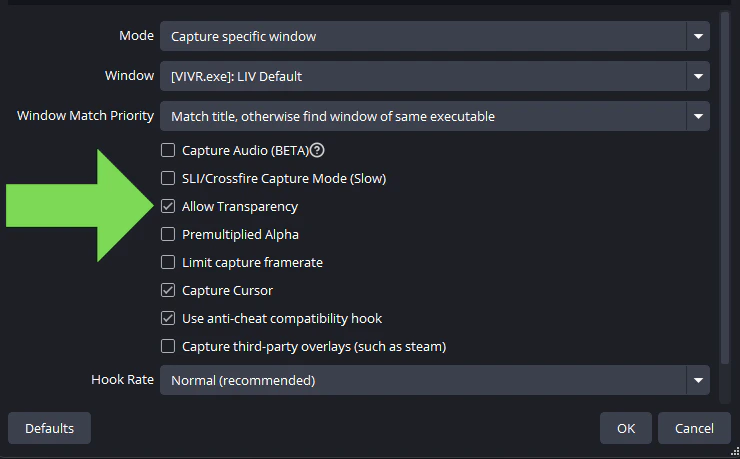
After following the setup guide to get LIV avatars working, open the LIV App and hit **Launch Compositor. **Click on the MANUAL tab.Launch the game you want to play from the SteamVR UI in VR or the Steam desktop app. If using OBS, you will want to capture the game using Game Capture or OpenVR Capture. Capture the LIV App Output using Game Capture also. Next, open the properties for the LIV App Output and check the Allow Transparency box.In OBS, you will want to make sure the LIV APP Output is listed above the game capture, as seen in the following screenshot.
If you are using Streamlabs OBS you want to follow the same steps as above.If you are using Twitch Studio you will need click edit scene > Select the layer with the LIV output > Select Border and click the eye to show
Example:
Was this page helpful?
{"docsConfig":{"theme":"mint","$schema":"https://mintlify.com/docs.json","name":"LIV Creator Documentation","description":"LIV Hub, LIV Camera, and LIV SteamVR app support","colors":{"primary":"#16A34A","light":"#07C983","dark":"#0F1010"},"logo":{"light":"https://mintcdn.com/liv-creators/HMPxFiX3Sh35PVht/logo/light.svg?fit=max\u0026auto=format\u0026n=HMPxFiX3Sh35PVht\u0026q=85\u0026s=e285ddf6db91f35d416f06ac03f6751b","dark":"https://mintcdn.com/liv-creators/HMPxFiX3Sh35PVht/logo/dark.svg?fit=max\u0026auto=format\u0026n=HMPxFiX3Sh35PVht\u0026q=85\u0026s=8c34aabcf559f33b42ff5a0788bb3334"},"favicon":"/favicon.png","background":{"color":{"dark":"#0F1010"}},"navbar":{"links":[],"primary":{"type":"button","label":"Dashboard","href":"https://dashboard.liv.tv/dev/login"}},"footer":{"socials":{"x":"https://twitter.com/LIV","youtube":"https://www.youtube.com/@liv","instagram":"https://www.instagram.com/liv","bluesky":"https://bsky.app/profile/liv.tv","discord":"https://liv.tv/discord","website":"https://liv.tv"}},"seo":{"indexing":"navigable"},"contextual":{"options":["copy","view","chatgpt","claude","perplexity","mcp","cursor","vscode"],"display":"header"},"styling":{"latex":false},"navigation":{"global":{"anchors":[{"anchor":"LIV Hub","icon":"vr-cardboard","href":"https://www.meta.com/en-gb/experiences/24199129276346881/"},{"anchor":"LIV Discord","icon":"discord","href":"https://discord.com/invite/liv"}]},"pages":[]}},"deployment":{"deploymentMetadataValue":{"subdomain":"liv-creators","hasAudioNarration":false,"actualSubdomain":"liv-creators","customDomains":[],"gitSource":{"type":"github","owner":"liv","repo":"liv-user-help-docs","deployBranch":"main","contentDirectory":"","isPrivate":true,"mountPath":"","label":""},"feedback":{"thumbs":true},"entitlements":{"AI_CHAT":{"status":"ENABLED"},"WEB_MCP":{"status":"ENABLED"},"NARRATION":{"status":"ENABLED"}},"buildId":"6ae94647fc206e01340adcb9:success","clientVersion":"0.0.4142","searchFilterCounts":[{"language":"default","tag":"LIV Steam App on PCVR","count":122},{"language":"default","tag":"Guides","count":98},{"language":"default","tag":"Troubleshooting","count":42},{"language":"default","tag":"LIV Hub and LIV Camera","count":38},{"language":"default","tag":"LIV Avatars and Virtual Cameras","count":31},{"language":"default","tag":"LIV Hub","count":23},{"language":"default","tag":"General LIV Steam App","count":21},{"language":"default","tag":"Mixed Reality","count":19},{"language":"default","tag":"StreamerKit","count":13},{"language":"default","tag":"FAQ","count":12}]},"assistantConfig":{"enableAskAiButton":false,"enableStarterQuestions":false,"enableAskAiSearchBar":true},"basePath":"","hasChatPermissions":true,"hasWebMcpPermissions":true,"toggles":[{"name":"kill-isr","enabled":true,"variant":{"name":"disabled","enabled":false,"feature_enabled":true},"impressionData":false},{"name":"custom-rbac-roles","enabled":true,"variant":{"name":"disabled","enabled":false,"feature_enabled":true},"impressionData":false},{"name":"agent-mintlify-slack","enabled":true,"variant":{"name":"disabled","enabled":false,"feature_enabled":true},"impressionData":false},{"name":"agent-integrations-settings","enabled":true,"variant":{"name":"disabled","enabled":false,"feature_enabled":true},"impressionData":false},{"name":"rbac-expansion","enabled":true,"variant":{"name":"disabled","enabled":false,"feature_enabled":true},"impressionData":false},{"name":"automations-pr-grouping","enabled":true,"variant":{"name":"disabled","enabled":false,"feature_enabled":true},"impressionData":false},{"name":"custom-prefix","enabled":true,"variant":{"name":"disabled","enabled":false,"feature_enabled":true},"impressionData":false},{"name":"analytics-v7","enabled":true,"variant":{"name":"disabled","enabled":false,"feature_enabled":true},"impressionData":false},{"name":"user-flows-analytics","enabled":true,"variant":{"name":"disabled","enabled":false,"feature_enabled":true},"impressionData":false},{"name":"no-publish-flow","enabled":true,"variant":{"name":"disabled","enabled":false,"feature_enabled":true},"impressionData":false},{"name":"workos-onboarding","enabled":true,"variant":{"name":"disabled","enabled":false,"feature_enabled":true},"impressionData":false},{"name":"snapshot-serving-live","enabled":true,"variant":{"name":"disabled","enabled":false,"feature_enabled":true},"impressionData":false},{"name":"stripTemperatureMiddleware","enabled":true,"variant":{"name":"disabled","enabled":false,"feature_enabled":true},"impressionData":false},{"name":"support-platform-pylon-zendesk","enabled":true,"variant":{"name":"disabled","enabled":false,"feature_enabled":true},"impressionData":false},{"name":"snapshot-serving","enabled":true,"variant":{"name":"disabled","enabled":false,"feature_enabled":true},"impressionData":false},{"name":"instant-rollback","enabled":true,"variant":{"name":"disabled","enabled":false,"feature_enabled":true},"impressionData":false},{"name":"granular-notifications-server","enabled":true,"variant":{"name":"disabled","enabled":false,"feature_enabled":true},"impressionData":false},{"name":"granular-notifications","enabled":true,"variant":{"name":"disabled","enabled":false,"feature_enabled":true},"impressionData":false},{"name":"automations-fable","enabled":true,"variant":{"name":"disabled","enabled":false,"feature_enabled":true},"impressionData":false},{"name":"fixed-ai-action-pricing","enabled":true,"variant":{"name":"disabled","enabled":false,"feature_enabled":true},"impressionData":false},{"name":"automation-resolve-merge-conflict","enabled":true,"variant":{"name":"disabled","enabled":false,"feature_enabled":true},"impressionData":false},{"name":"scoped-publishing","enabled":true,"variant":{"name":"disabled","enabled":false,"feature_enabled":true},"impressionData":false},{"name":"mintql","enabled":true,"variant":{"name":"disabled","enabled":false,"feature_enabled":true},"impressionData":false},{"name":"page-level-analytics","enabled":true,"variant":{"name":"disabled","enabled":false,"feature_enabled":true},"impressionData":false},{"name":"editor-version-history-v2","enabled":true,"variant":{"name":"disabled","enabled":false,"feature_enabled":true},"impressionData":false},{"name":"billing-page-v2","enabled":true,"variant":{"name":"disabled","enabled":false,"feature_enabled":true},"impressionData":false},{"name":"full-page-search","enabled":true,"variant":{"name":"disabled","enabled":false,"feature_enabled":true},"impressionData":false},{"name":"workspace-projects","enabled":true,"variant":{"name":"disabled","enabled":false,"feature_enabled":true},"impressionData":false},{"name":"assistant-v5","enabled":true,"variant":{"name":"disabled","enabled":false,"feature_enabled":true},"impressionData":false},{"name":"fork-pr-previews","enabled":true,"variant":{"name":"disabled","enabled":false,"feature_enabled":true},"impressionData":false},{"name":"revalidation-jwt","enabled":true,"variant":{"name":"disabled","enabled":false,"feature_enabled":true},"impressionData":false},{"name":"workos-sso-scim","enabled":true,"variant":{"name":"disabled","enabled":false,"feature_enabled":true},"impressionData":false},{"name":"hobby-abuse-scan","enabled":true,"variant":{"name":"disabled","enabled":false,"feature_enabled":true},"impressionData":false},{"name":"dashboard-inbox","enabled":true,"variant":{"name":"disabled","enabled":false,"feature_enabled":true},"impressionData":false},{"name":"workos-signup","enabled":true,"variant":{"name":"disabled","enabled":false,"feature_enabled":true},"impressionData":false},{"name":"turbopuffer-dual-write","enabled":true,"variant":{"name":"disabled","enabled":false,"feature_enabled":true},"impressionData":false},{"name":"workos-enabled","enabled":true,"variant":{"name":"disabled","enabled":false,"feature_enabled":true},"impressionData":false},{"name":"approve-review-flow","enabled":true,"variant":{"name":"disabled","enabled":false,"feature_enabled":true},"impressionData":false},{"name":"editor-metadata","enabled":true,"variant":{"name":"disabled","enabled":false,"feature_enabled":true},"impressionData":false},{"name":"sso-setup-deadline-banner","enabled":true,"variant":{"name":"disabled","enabled":false,"feature_enabled":true},"impressionData":false},{"name":"turbopuffer-serve","enabled":true,"variant":{"name":"disabled","enabled":false,"feature_enabled":true},"impressionData":false},{"name":"live-agents","enabled":true,"variant":{"name":"disabled","enabled":false,"feature_enabled":true},"impressionData":false},{"name":"llms-txt-v2","enabled":true,"variant":{"name":"disabled","enabled":false,"feature_enabled":true},"impressionData":false}],"googleFontsInlined":false},"customCss":[],"page":{"pagePath":"liv-steam-app-on-pcvr/guides/liv-avatars-and-virtual-cameras/avatar-overlay","slug":"/liv-steam-app-on-pcvr/guides/liv-avatars-and-virtual-cameras/avatar-overlay","pageMetadata":{"title":"Use LIV Avatars as an overlay only","description":null,"href":"/liv-steam-app-on-pcvr/guides/liv-avatars-and-virtual-cameras/avatar-overlay","hidden":false},"pageType":"default","mdx":{"mdxSource":{"compiledSource":"\"use strict\";const{Fragment:_Fragment,jsx:_jsx,jsxs:_jsxs}=arguments[0];const{useMDXComponents:_provideComponents}=arguments[0];function _createMdxContent(props){const _components={a:`a`,br:`br`,p:`p`,strong:`strong`,..._provideComponents(),...props.components},{OptimizedImage}=_components;if(!OptimizedImage)_missingMdxReference(`OptimizedImage`,true);return _jsxs(_Fragment,{children:[_jsxs(_components.p,{children:[`After following the `,_jsx(_components.a,{href:`/liv-steam-app-on-pcvr/guides/liv-avatars-and-virtual-cameras/avatar-startup-guide`,children:`setup guide`}),` to get LIV avatars working, open the `,_jsx(_components.strong,{children:`LIV App`}),` and hit **Launch Compositor. **Click on the `,_jsx(_components.strong,{children:`MANUAL`}),` tab.`]}),`\n`,_jsx(OptimizedImage,{src:`https://mintcdn.com/liv-creators/w_blWBwO7_BRzRKY/images/livsteamapp/Manualtab.png?fit=max\u0026auto=format\u0026n=w_blWBwO7_BRzRKY\u0026q=85\u0026s=0303fb522553f8626f329fcb3bd5af2f`,alt:`Manualtab`,\"data-og-width\":`453`,width:`453`,\"data-og-height\":`377`,height:`377`,\"data-path\":`images/livsteamapp/Manualtab.png`,\"data-optimize\":`true`,\"data-opv\":`3`,srcset:`https://mintcdn.com/liv-creators/w_blWBwO7_BRzRKY/images/livsteamapp/Manualtab.png?w=280\u0026fit=max\u0026auto=format\u0026n=w_blWBwO7_BRzRKY\u0026q=85\u0026s=e6b0056b545d69ce7314c0aeebc0bd67 280w, https://mintcdn.com/liv-creators/w_blWBwO7_BRzRKY/images/livsteamapp/Manualtab.png?w=560\u0026fit=max\u0026auto=format\u0026n=w_blWBwO7_BRzRKY\u0026q=85\u0026s=955698d714eff10eec79c5c45276fdf8 560w, https://mintcdn.com/liv-creators/w_blWBwO7_BRzRKY/images/livsteamapp/Manualtab.png?w=840\u0026fit=max\u0026auto=format\u0026n=w_blWBwO7_BRzRKY\u0026q=85\u0026s=dd496c2e5139cbc2eac499d3d49dad72 840w, https://mintcdn.com/liv-creators/w_blWBwO7_BRzRKY/images/livsteamapp/Manualtab.png?w=1100\u0026fit=max\u0026auto=format\u0026n=w_blWBwO7_BRzRKY\u0026q=85\u0026s=600807596120d04db504ed42e57f1c32 1100w, https://mintcdn.com/liv-creators/w_blWBwO7_BRzRKY/images/livsteamapp/Manualtab.png?w=1650\u0026fit=max\u0026auto=format\u0026n=w_blWBwO7_BRzRKY\u0026q=85\u0026s=03c04fba5b2778a871fa2a7d6427b54b 1650w, https://mintcdn.com/liv-creators/w_blWBwO7_BRzRKY/images/livsteamapp/Manualtab.png?w=2500\u0026fit=max\u0026auto=format\u0026n=w_blWBwO7_BRzRKY\u0026q=85\u0026s=e19131273c156d347c2eaa468e604a36 2500w`}),`\n`,_jsxs(_components.p,{children:[`Launch the game you want to play from the SteamVR UI in VR or the Steam desktop app. If using OBS, you will want to capture the game using `,_jsx(_components.strong,{children:`Game Capture`}),` or `,_jsx(_components.a,{href:`https://github.com/baffler/OBS-OpenVR-Input-Plugin/releases`,children:_jsx(_components.strong,{children:`OpenVR Capture`})}),`. Capture the LIV App Output using `,_jsx(_components.strong,{children:`Game Capture`}),` also. Next, open the properties for the LIV App Output and check the `,_jsx(_components.strong,{children:`Allow Transparency`}),` box.`]}),`\n`,_jsx(OptimizedImage,{src:`https://mintcdn.com/liv-creators/HTsEgAJP4Tws8qCs/images/livsteamapp/OBS_allow_transparency.png?fit=max\u0026auto=format\u0026n=HTsEgAJP4Tws8qCs\u0026q=85\u0026s=9976f004bb25898ff05e30b2e0889bcc`,alt:`OBS Allow Transparency`,\"data-og-width\":`740`,width:`740`,\"data-og-height\":`459`,height:`459`,\"data-path\":`images/livsteamapp/OBS_allow_transparency.png`,\"data-optimize\":`true`,\"data-opv\":`3`,srcset:`https://mintcdn.com/liv-creators/HTsEgAJP4Tws8qCs/images/livsteamapp/OBS_allow_transparency.png?w=280\u0026fit=max\u0026auto=format\u0026n=HTsEgAJP4Tws8qCs\u0026q=85\u0026s=c89d5a561dc3957009b914aebd3e9d81 280w, https://mintcdn.com/liv-creators/HTsEgAJP4Tws8qCs/images/livsteamapp/OBS_allow_transparency.png?w=560\u0026fit=max\u0026auto=format\u0026n=HTsEgAJP4Tws8qCs\u0026q=85\u0026s=6864db8dd432cba4220b07be0af5b1f8 560w, https://mintcdn.com/liv-creators/HTsEgAJP4Tws8qCs/images/livsteamapp/OBS_allow_transparency.png?w=840\u0026fit=max\u0026auto=format\u0026n=HTsEgAJP4Tws8qCs\u0026q=85\u0026s=d4bb7551763147cd5c223bdd4c39ad6e 840w, https://mintcdn.com/liv-creators/HTsEgAJP4Tws8qCs/images/livsteamapp/OBS_allow_transparency.png?w=1100\u0026fit=max\u0026auto=format\u0026n=HTsEgAJP4Tws8qCs\u0026q=85\u0026s=d95a9a3f117439b0e1c4bbb5d2dd7fe0 1100w, https://mintcdn.com/liv-creators/HTsEgAJP4Tws8qCs/images/livsteamapp/OBS_allow_transparency.png?w=1650\u0026fit=max\u0026auto=format\u0026n=HTsEgAJP4Tws8qCs\u0026q=85\u0026s=7c4bb5e73df763c30a7ecde25f1f668b 1650w, https://mintcdn.com/liv-creators/HTsEgAJP4Tws8qCs/images/livsteamapp/OBS_allow_transparency.png?w=2500\u0026fit=max\u0026auto=format\u0026n=HTsEgAJP4Tws8qCs\u0026q=85\u0026s=d0c9bc4c705908aa2e4e031dd04edd18 2500w`}),`\n`,_jsx(_components.p,{children:`In OBS, you will want to make sure the LIV APP Output is listed above the game capture, as seen in the following screenshot.`}),`\n`,_jsx(OptimizedImage,{src:`https://mintcdn.com/liv-creators/S-J8sC0KTGBKTMil/images/livsteamapp/obs_source.png?fit=max\u0026auto=format\u0026n=S-J8sC0KTGBKTMil\u0026q=85\u0026s=22e18cc49d51ae5de25f3bcb1f22bd42`,alt:`Obs Source`,\"data-og-width\":`206`,width:`206`,\"data-og-height\":`200`,height:`200`,\"data-path\":`images/livsteamapp/obs_source.png`,\"data-optimize\":`true`,\"data-opv\":`3`,srcset:`https://mintcdn.com/liv-creators/S-J8sC0KTGBKTMil/images/livsteamapp/obs_source.png?w=280\u0026fit=max\u0026auto=format\u0026n=S-J8sC0KTGBKTMil\u0026q=85\u0026s=70e8743fb264cce1a02d4293eb1be7f7 280w, https://mintcdn.com/liv-creators/S-J8sC0KTGBKTMil/images/livsteamapp/obs_source.png?w=560\u0026fit=max\u0026auto=format\u0026n=S-J8sC0KTGBKTMil\u0026q=85\u0026s=8101244b249d1e9e723b04c69f61bacb 560w, https://mintcdn.com/liv-creators/S-J8sC0KTGBKTMil/images/livsteamapp/obs_source.png?w=840\u0026fit=max\u0026auto=format\u0026n=S-J8sC0KTGBKTMil\u0026q=85\u0026s=8fe8e25f37fe7e5d37187e41ad3c2ee7 840w, https://mintcdn.com/liv-creators/S-J8sC0KTGBKTMil/images/livsteamapp/obs_source.png?w=1100\u0026fit=max\u0026auto=format\u0026n=S-J8sC0KTGBKTMil\u0026q=85\u0026s=2661f574e9fc96a414f348a35d4548d1 1100w, https://mintcdn.com/liv-creators/S-J8sC0KTGBKTMil/images/livsteamapp/obs_source.png?w=1650\u0026fit=max\u0026auto=format\u0026n=S-J8sC0KTGBKTMil\u0026q=85\u0026s=96c528b08e55f7790e3a6fb4a428270a 1650w, https://mintcdn.com/liv-creators/S-J8sC0KTGBKTMil/images/livsteamapp/obs_source.png?w=2500\u0026fit=max\u0026auto=format\u0026n=S-J8sC0KTGBKTMil\u0026q=85\u0026s=bf445e14d01cbc124aa3e064c0cba8f1 2500w`}),`\n`,_jsxs(_components.p,{children:[_jsx(_components.br,{}),`\n`,`If you are using `,_jsx(_components.strong,{children:`Streamlabs OBS`}),` you want to follow the same steps as above.`]}),`\n`,_jsx(OptimizedImage,{src:`https://mintcdn.com/liv-creators/S-J8sC0KTGBKTMil/images/livsteamapp/slobs_allow_transparency.png?fit=max\u0026auto=format\u0026n=S-J8sC0KTGBKTMil\u0026q=85\u0026s=f0b4944f7a2fcf3fc345e9f0a7093819`,alt:`Slobs Allow Transparency`,\"data-og-width\":`600`,width:`600`,\"data-og-height\":`800`,height:`800`,\"data-path\":`images/livsteamapp/slobs_allow_transparency.png`,\"data-optimize\":`true`,\"data-opv\":`3`,srcset:`https://mintcdn.com/liv-creators/S-J8sC0KTGBKTMil/images/livsteamapp/slobs_allow_transparency.png?w=280\u0026fit=max\u0026auto=format\u0026n=S-J8sC0KTGBKTMil\u0026q=85\u0026s=4be7128e040612dfd39b633faadc84ba 280w, https://mintcdn.com/liv-creators/S-J8sC0KTGBKTMil/images/livsteamapp/slobs_allow_transparency.png?w=560\u0026fit=max\u0026auto=format\u0026n=S-J8sC0KTGBKTMil\u0026q=85\u0026s=dc7b7a39a477c3a1ce1186ca4fe62cb1 560w, https://mintcdn.com/liv-creators/S-J8sC0KTGBKTMil/images/livsteamapp/slobs_allow_transparency.png?w=840\u0026fit=max\u0026auto=format\u0026n=S-J8sC0KTGBKTMil\u0026q=85\u0026s=0c93e2e03ab68be6f537814d4a1ea042 840w, https://mintcdn.com/liv-creators/S-J8sC0KTGBKTMil/images/livsteamapp/slobs_allow_transparency.png?w=1100\u0026fit=max\u0026auto=format\u0026n=S-J8sC0KTGBKTMil\u0026q=85\u0026s=2ce73d5fd6a1abb7ce95c66b7cdd5577 1100w, https://mintcdn.com/liv-creators/S-J8sC0KTGBKTMil/images/livsteamapp/slobs_allow_transparency.png?w=1650\u0026fit=max\u0026auto=format\u0026n=S-J8sC0KTGBKTMil\u0026q=85\u0026s=fc14971f2497c8b0539d145851e099e5 1650w, https://mintcdn.com/liv-creators/S-J8sC0KTGBKTMil/images/livsteamapp/slobs_allow_transparency.png?w=2500\u0026fit=max\u0026auto=format\u0026n=S-J8sC0KTGBKTMil\u0026q=85\u0026s=49a5b11c774dd71eb3859985baf43233 2500w`}),`\n`,_jsxs(_components.p,{children:[`If you are using `,_jsx(_components.strong,{children:`Twitch Studio`}),` you will need click edit scene > Select the layer with the LIV output > Select Border and click the eye to show`]}),`\n`,_jsx(OptimizedImage,{src:`https://mintcdn.com/liv-creators/FhyZvrvUg_BFrE8M/images/livsteamapp/twitch_studio_selectborder.png?fit=max\u0026auto=format\u0026n=FhyZvrvUg_BFrE8M\u0026q=85\u0026s=8a1decbf46a4e8b670d84e2e2a32680a`,alt:`Twitch Studio Selectborder`,\"data-og-width\":`264`,width:`264`,\"data-og-height\":`106`,height:`106`,\"data-path\":`images/livsteamapp/twitch_studio_selectborder.png`,\"data-optimize\":`true`,\"data-opv\":`3`,srcset:`https://mintcdn.com/liv-creators/FhyZvrvUg_BFrE8M/images/livsteamapp/twitch_studio_selectborder.png?w=280\u0026fit=max\u0026auto=format\u0026n=FhyZvrvUg_BFrE8M\u0026q=85\u0026s=64b5eb2dda0139e011fe316cfa28adcb 280w, https://mintcdn.com/liv-creators/FhyZvrvUg_BFrE8M/images/livsteamapp/twitch_studio_selectborder.png?w=560\u0026fit=max\u0026auto=format\u0026n=FhyZvrvUg_BFrE8M\u0026q=85\u0026s=450461e491d4ed1fcb1d349186c4dfd7 560w, https://mintcdn.com/liv-creators/FhyZvrvUg_BFrE8M/images/livsteamapp/twitch_studio_selectborder.png?w=840\u0026fit=max\u0026auto=format\u0026n=FhyZvrvUg_BFrE8M\u0026q=85\u0026s=761b6ea9366c47af09071f4bad773e50 840w, https://mintcdn.com/liv-creators/FhyZvrvUg_BFrE8M/images/livsteamapp/twitch_studio_selectborder.png?w=1100\u0026fit=max\u0026auto=format\u0026n=FhyZvrvUg_BFrE8M\u0026q=85\u0026s=9c4a1740be4d5a1a80b7704ab8cb2178 1100w, https://mintcdn.com/liv-creators/FhyZvrvUg_BFrE8M/images/livsteamapp/twitch_studio_selectborder.png?w=1650\u0026fit=max\u0026auto=format\u0026n=FhyZvrvUg_BFrE8M\u0026q=85\u0026s=00fb8ce1bfecbcde9019ae2b65123b2a 1650w, https://mintcdn.com/liv-creators/FhyZvrvUg_BFrE8M/images/livsteamapp/twitch_studio_selectborder.png?w=2500\u0026fit=max\u0026auto=format\u0026n=FhyZvrvUg_BFrE8M\u0026q=85\u0026s=1080be90c093678c3e3948cca5b55851 2500w`}),`\n`,_jsxs(_components.p,{children:[_jsx(_components.br,{}),`\n`,_jsx(_components.br,{}),`\n`,_jsx(_components.strong,{children:`Example:`})]}),`\n`,_jsx(OptimizedImage,{src:`https://mintcdn.com/liv-creators/S-J8sC0KTGBKTMil/images/livsteamapp/avatar_overlay.png?fit=max\u0026auto=format\u0026n=S-J8sC0KTGBKTMil\u0026q=85\u0026s=67161ba8de71a9047fe09a04a61237d2`,alt:`Avatar Overlay`,\"data-og-width\":`582`,width:`582`,\"data-og-height\":`329`,height:`329`,\"data-path\":`images/livsteamapp/avatar_overlay.png`,\"data-optimize\":`true`,\"data-opv\":`3`,srcset:`https://mintcdn.com/liv-creators/S-J8sC0KTGBKTMil/images/livsteamapp/avatar_overlay.png?w=280\u0026fit=max\u0026auto=format\u0026n=S-J8sC0KTGBKTMil\u0026q=85\u0026s=186e53fc8ef5f5604e001ae98599a759 280w, https://mintcdn.com/liv-creators/S-J8sC0KTGBKTMil/images/livsteamapp/avatar_overlay.png?w=560\u0026fit=max\u0026auto=format\u0026n=S-J8sC0KTGBKTMil\u0026q=85\u0026s=9556a5efd94ea9ac5ae7f44ba9234214 560w, https://mintcdn.com/liv-creators/S-J8sC0KTGBKTMil/images/livsteamapp/avatar_overlay.png?w=840\u0026fit=max\u0026auto=format\u0026n=S-J8sC0KTGBKTMil\u0026q=85\u0026s=b0ca3ea59692613ccfa394ca58144bd8 840w, https://mintcdn.com/liv-creators/S-J8sC0KTGBKTMil/images/livsteamapp/avatar_overlay.png?w=1100\u0026fit=max\u0026auto=format\u0026n=S-J8sC0KTGBKTMil\u0026q=85\u0026s=316d1900d22ccb1941d13e425f7222bc 1100w, https://mintcdn.com/liv-creators/S-J8sC0KTGBKTMil/images/livsteamapp/avatar_overlay.png?w=1650\u0026fit=max\u0026auto=format\u0026n=S-J8sC0KTGBKTMil\u0026q=85\u0026s=efc4f33d5ab6f6d107c1ec7fe4a61d65 1650w, https://mintcdn.com/liv-creators/S-J8sC0KTGBKTMil/images/livsteamapp/avatar_overlay.png?w=2500\u0026fit=max\u0026auto=format\u0026n=S-J8sC0KTGBKTMil\u0026q=85\u0026s=4f4b07f6e2cc8e70ff1b0a5271f2e036 2500w`})]})}function MDXContent(props={}){const{wrapper:MDXLayout}={..._provideComponents(),...props.components};return MDXLayout?_jsx(MDXLayout,{...props,children:_jsx(_createMdxContent,{...props})}):_createMdxContent(props)}return{default:MDXContent};function _missingMdxReference(id,component){throw new Error(`Expected `+(component?`component`:`object`)+\" `\"+id+\"` to be defined: you likely forgot to import, pass, or provide it.\")}","frontmatter":{},"scope":{"config":{},"pageMetadata":{"title":"Use LIV Avatars as an overlay only","description":null,"href":"/liv-steam-app-on-pcvr/guides/liv-avatars-and-virtual-cameras/avatar-overlay","hidden":false}}},"mdxSourceWithNoJs":null},"mdxExtracts":{"tableOfContents":[],"codeExamples":{}},"jsLinks":["/_mintlify/custom/liv-creators/b1cda4179d8fd79d/umami-inject.js"],"subdomain":"liv-creators","siteName":"LIV Creator Documentation","title":"Use LIV Avatars as an overlay only - LIV Creator Documentation","navMaps":{"firstHrefInVersion":{},"firstHrefInLanguage":{}},"lastModified":"2026-03-05T17:07:31.038Z","originalFileLocation":"liv-steam-app-on-pcvr/guides/liv-avatars-and-virtual-cameras/avatar-overlay.mdx"},"headHtml":"\u003cscript data-mint-head>(function(){var d=document.documentElement,p=null;if(!p){try{p=localStorage.getItem(\"isDarkMode\")}catch(e){}if(p==='true')p='dark';else if(p==='false')p='light';if(p!=='light'\u0026\u0026p!=='dark'\u0026\u0026p!=='system')p=\"system\"}var r=p==='system'?(matchMedia(\"(prefers-color-scheme: dark)\").matches?'dark':'light'):p;d.classList.remove(r==='dark'?'light':'dark');d.classList.add(r);d.setAttribute(\"data-theme-preference\",p)})();\u003c/script>\u003cmeta data-mint-head name=\"application-name\" content=\"LIV Creator Documentation\">\u003cmeta data-mint-head name=\"generator\" content=\"Mintlify\">\u003clink data-mint-head rel=\"icon\" type=\"image/png\" sizes=\"192x192\" href=\"/mintlify-assets/_mintlify/favicons/liv-creators/dKSRcDNPvK-w20Ab/_generated/favicon/android-chrome-192x192.png\" media=\"(prefers-color-scheme: light)\">\u003clink data-mint-head rel=\"apple-touch-icon\" type=\"image/png\" sizes=\"180x180\" href=\"/mintlify-assets/_mintlify/favicons/liv-creators/dKSRcDNPvK-w20Ab/_generated/favicon/apple-touch-icon.png\">\u003clink data-mint-head rel=\"icon\" type=\"image/png\" sizes=\"16x16\" href=\"/mintlify-assets/_mintlify/favicons/liv-creators/dKSRcDNPvK-w20Ab/_generated/favicon/favicon-16x16.png\" media=\"(prefers-color-scheme: light)\">\u003clink data-mint-head rel=\"icon\" type=\"image/png\" sizes=\"32x32\" href=\"/mintlify-assets/_mintlify/favicons/liv-creators/dKSRcDNPvK-w20Ab/_generated/favicon/favicon-32x32.png\" media=\"(prefers-color-scheme: light)\">\u003clink data-mint-head rel=\"shortcut icon\" type=\"image/x-icon\" href=\"/mintlify-assets/_mintlify/favicons/liv-creators/dKSRcDNPvK-w20Ab/_generated/favicon/favicon.ico\" media=\"(prefers-color-scheme: light)\">\u003clink data-mint-head rel=\"icon\" type=\"image/png\" sizes=\"192x192\" href=\"/mintlify-assets/_mintlify/favicons/liv-creators/dKSRcDNPvK-w20Ab/_generated/favicon-dark/android-chrome-192x192.png\" media=\"(prefers-color-scheme: dark)\">\u003clink data-mint-head rel=\"icon\" type=\"image/png\" sizes=\"16x16\" href=\"/mintlify-assets/_mintlify/favicons/liv-creators/dKSRcDNPvK-w20Ab/_generated/favicon-dark/favicon-16x16.png\" media=\"(prefers-color-scheme: dark)\">\u003clink data-mint-head rel=\"icon\" type=\"image/png\" sizes=\"32x32\" href=\"/mintlify-assets/_mintlify/favicons/liv-creators/dKSRcDNPvK-w20Ab/_generated/favicon-dark/favicon-32x32.png\" media=\"(prefers-color-scheme: dark)\">\u003clink data-mint-head rel=\"shortcut icon\" type=\"image/x-icon\" href=\"/mintlify-assets/_mintlify/favicons/liv-creators/dKSRcDNPvK-w20Ab/_generated/favicon-dark/favicon.ico\" media=\"(prefers-color-scheme: dark)\">\u003cmeta data-mint-head property=\"og:title\" content=\"Use LIV Avatars as an overlay only - LIV Creator Documentation\">\u003cmeta data-mint-head property=\"og:site_name\" content=\"LIV Creator Documentation\">\u003cmeta data-mint-head property=\"og:url\" content=\"https://liv-creators.mintlify.app/liv-steam-app-on-pcvr/guides/liv-avatars-and-virtual-cameras/avatar-overlay\">\u003cmeta data-mint-head property=\"og:type\" content=\"website\">\u003cmeta data-mint-head property=\"og:image\" content=\"https://liv-creators.mintlify.site/_mintlify/api/og/v2?division=LIV+Avatars+and+Virtual+Cameras\u0026amp;title=Use+LIV+Avatars+as+an+overlay+only\u0026amp;theme=abcefa90a372211be90edacf\u0026amp;signature=fbf97d57bfaef8cf4e5abe92636229d328de55191d145ea42abfb23b12a2da70\">\u003cmeta data-mint-head property=\"og:image:width\" content=\"1200\">\u003cmeta data-mint-head property=\"og:image:height\" content=\"630\">\u003cmeta data-mint-head name=\"twitter:card\" content=\"summary_large_image\">\u003cmeta data-mint-head name=\"twitter:title\" content=\"Use LIV Avatars as an overlay only - LIV Creator Documentation\">\u003cmeta data-mint-head name=\"twitter:image\" content=\"https://liv-creators.mintlify.site/_mintlify/api/og/v2?division=LIV+Avatars+and+Virtual+Cameras\u0026amp;title=Use+LIV+Avatars+as+an+overlay+only\u0026amp;theme=abcefa90a372211be90edacf\u0026amp;signature=fbf97d57bfaef8cf4e5abe92636229d328de55191d145ea42abfb23b12a2da70\">\u003cmeta data-mint-head name=\"twitter:image:width\" content=\"1200\">\u003cmeta data-mint-head name=\"twitter:image:height\" content=\"630\">\u003cmeta data-mint-head name=\"msapplication-config\" content=\"/mintlify-assets/_mintlify/favicons/liv-creators/dKSRcDNPvK-w20Ab/_generated/favicon/browserconfig.xml\">\u003cmeta data-mint-head name=\"apple-mobile-web-app-title\" content=\"LIV Creator Documentation\">\u003cmeta data-mint-head name=\"msapplication-TileColor\" content=\"#16A34A\">\u003clink data-mint-head rel=\"canonical\" href=\"https://liv-creators.mintlify.app/liv-steam-app-on-pcvr/guides/liv-avatars-and-virtual-cameras/avatar-overlay\">\u003clink data-mint-head rel=\"alternate\" type=\"application/xml\" href=\"/sitemap.xml\">\u003clink data-mint-head rel=\"alternate\" type=\"text/markdown\" href=\"/liv-steam-app-on-pcvr/guides/liv-avatars-and-virtual-cameras/avatar-overlay.md\">\u003cscript data-mint-head type=\"application/ld+json\">{\"@context\":\"https://schema.org\",\"@graph\":[{\"@type\":\"Organization\",\"@id\":\"https://liv-creators.mintlify.app/#organization\",\"name\":\"LIV Creator Documentation\",\"url\":\"https://liv-creators.mintlify.app\",\"logo\":{\"@type\":\"ImageObject\",\"url\":\"https://mintcdn.com/liv-creators/HMPxFiX3Sh35PVht/logo/light.svg?fit=max\u0026auto=format\u0026n=HMPxFiX3Sh35PVht\u0026q=85\u0026s=e285ddf6db91f35d416f06ac03f6751b\"}},{\"@type\":\"WebSite\",\"@id\":\"https://liv-creators.mintlify.app#website\",\"name\":\"LIV Creator Documentation\",\"url\":\"https://liv-creators.mintlify.app\",\"publisher\":{\"@id\":\"https://liv-creators.mintlify.app/#organization\"}},{\"@type\":\"WebPage\",\"@id\":\"https://liv-creators.mintlify.app/liv-steam-app-on-pcvr/guides/liv-avatars-and-virtual-cameras/avatar-overlay#webpage\",\"url\":\"https://liv-creators.mintlify.app/liv-steam-app-on-pcvr/guides/liv-avatars-and-virtual-cameras/avatar-overlay\",\"name\":\"Use LIV Avatars as an overlay only\",\"dateModified\":\"2026-03-05T17:07:31.038Z\",\"isPartOf\":{\"@id\":\"https://liv-creators.mintlify.app#website\"},\"breadcrumb\":{\"@id\":\"https://liv-creators.mintlify.app/liv-steam-app-on-pcvr/guides/liv-avatars-and-virtual-cameras/avatar-overlay#breadcrumb\"}},{\"@type\":\"BreadcrumbList\",\"@id\":\"https://liv-creators.mintlify.app/liv-steam-app-on-pcvr/guides/liv-avatars-and-virtual-cameras/avatar-overlay#breadcrumb\",\"itemListElement\":[{\"@type\":\"ListItem\",\"position\":1,\"name\":\"LIV Avatars and Virtual Cameras\",\"item\":\"https://liv-creators.mintlify.app/liv-steam-app-on-pcvr/guides/liv-avatars-and-virtual-cameras/avatar-startup-guide\"},{\"@type\":\"ListItem\",\"position\":2,\"name\":\"Use LIV Avatars as an overlay only\",\"item\":\"https://liv-creators.mintlify.app/liv-steam-app-on-pcvr/guides/liv-avatars-and-virtual-cameras/avatar-overlay\"}]},{\"@type\":[\"Article\",\"TechArticle\"],\"@id\":\"https://liv-creators.mintlify.app/liv-steam-app-on-pcvr/guides/liv-avatars-and-virtual-cameras/avatar-overlay#article\",\"headline\":\"Use LIV Avatars as an overlay only\",\"name\":\"Use LIV Avatars as an overlay only\",\"url\":\"https://liv-creators.mintlify.app/liv-steam-app-on-pcvr/guides/liv-avatars-and-virtual-cameras/avatar-overlay\",\"mainEntityOfPage\":{\"@id\":\"https://liv-creators.mintlify.app/liv-steam-app-on-pcvr/guides/liv-avatars-and-virtual-cameras/avatar-overlay#webpage\"},\"dateModified\":\"2026-03-05T17:07:31.038Z\",\"publisher\":{\"@id\":\"https://liv-creators.mintlify.app/#organization\"},\"isPartOf\":{\"@id\":\"https://liv-creators.mintlify.app#website\"}}]}\u003c/script>\u003cscript data-mint-head type=\"application/ld+json\">{\"@context\":\"https://schema.org\",\"@type\":\"WebSite\",\"name\":\"LIV Creator Documentation\",\"publisher\":{\"@type\":\"Organization\",\"name\":\"LIV Creator Documentation\"},\"provider\":{\"@type\":\"Organization\",\"name\":\"Mintlify\",\"url\":\"https://mintlify.com\"}}\u003c/script>","agentPointerHref":"/liv-steam-app-on-pcvr/guides/liv-avatars-and-virtual-cameras/avatar-overlay.md","siteName":"LIV Creator Documentation","nav":{"global":{"anchors":[{"anchor":"LIV Hub","icon":"vr-cardboard","href":"https://www.meta.com/en-gb/experiences/24199129276346881/"},{"anchor":"LIV Discord","icon":"discord","href":"https://discord.com/invite/liv"}]},"products":[{"product":"LIV Hub and LIV Camera","description":"LIV Hub on the Meta Quest","pages":[{"title":"LIV Hub and LIV Camera","href":"/liv-hub-and-liv-camera/home"}]},{"product":"LIV Steam App on PCVR","description":"LIV Steam App","tabs":[{"tab":"Home","pages":[{"title":"Home","href":"/liv-steam-app-on-pcvr/home/what-is-liv-steamvr-app"}]},{"tab":"Guides","groups":[{"group":"Mixed Reality","pages":[{"title":"LIV Mixed Reality Quick Start Guide","href":"/liv-steam-app-on-pcvr/guides/mixed-reality/quick-start-guide"},{"title":"1. Install LIV's SteamVR driver","href":"/liv-steam-app-on-pcvr/guides/mixed-reality/steamvr-driver"},{"title":"2. Create Mixed Reality Camera Profile","href":"/liv-steam-app-on-pcvr/guides/mixed-reality/mr-camera-profile"},{"title":"3. Preparing Your Calibration","href":"/liv-steam-app-on-pcvr/guides/mixed-reality/pre-calibration"},{"title":"4. Calibrating Your Camera","href":"/liv-steam-app-on-pcvr/guides/mixed-reality/camera-calibration"},{"title":"5. Start Capturing (MR)","href":"/liv-steam-app-on-pcvr/guides/mixed-reality/start-capture"},{"group":"Feature guides","pages":[{"title":"Capture Meta Presence Platform with LIV","href":"/liv-steam-app-on-pcvr/guides/mixed-reality/capture-meta-presence-platform"},{"title":"Compositing passthrough capture","href":"/liv-steam-app-on-pcvr/guides/mixed-reality/compositing-passthrough-capture"},{"title":"LIV Meta Presence Platform support","href":"/liv-steam-app-on-pcvr/guides/mixed-reality/meta-presence-platform"},{"title":"Touge's Mixed Reality Post-Production","href":"/liv-steam-app-on-pcvr/guides/mixed-reality/dump-mode-composition"},{"title":"What is De-spill, and how do I use it in LIV?","href":"/liv-steam-app-on-pcvr/guides/mixed-reality/despill-adjustment"},{"title":"Additional Features (MR)","href":"/liv-steam-app-on-pcvr/guides/mixed-reality/feature-guides/additional-mr-features"},{"title":"Setup a Tracked/moveable camera","href":"/liv-steam-app-on-pcvr/guides/mixed-reality/feature-guides/tracked-camera"},{"title":"Minimizing Playspace Drift with Quest Standalone and Lighthouse Tracking","href":"/liv-steam-app-on-pcvr/guides/mixed-reality/minimize-drift"},{"title":"BETA - Mixed Reality without a green screen with Nvidia GPUs","href":"/liv-steam-app-on-pcvr/guides/mixed-reality/mixed-reality-no-green-screen"},{"title":"OpenVR Space Rotation","href":"/liv-steam-app-on-pcvr/guides/mixed-reality/openvr-space-rotation"},{"title":"How To Create a Static Mask","href":"/liv-steam-app-on-pcvr/guides/mixed-reality/create-static-mask"},{"title":"Kinect v2 or Kinect Azure no green screen solution","href":"/liv-steam-app-on-pcvr/guides/mixed-reality/kinect-no-green-screen"}]},{"title":"ragesaqs technique for getting perfect calibration","href":"/liv-steam-app-on-pcvr/guides/mixed-reality/calibration-guide"}]},{"group":"LIV Avatars and Virtual Cameras","pages":[{"title":"Avatar Quick Start Guide","href":"/liv-steam-app-on-pcvr/guides/liv-avatars-and-virtual-cameras/avatar-startup-guide"},{"title":"Install LIV's SteamVR driver","href":"/liv-steam-app-on-pcvr/guides/liv-avatars-and-virtual-cameras/untitled-page"},{"title":"Create Avatar Camera Profile","href":"/liv-steam-app-on-pcvr/guides/liv-avatars-and-virtual-cameras/avatar-camera-profile"},{"title":"Find, Install, and Remove Avatars","href":"/liv-steam-app-on-pcvr/guides/liv-avatars-and-virtual-cameras/manage-avatars"},{"title":"Enter the LIV Avatar Interface","href":"/liv-steam-app-on-pcvr/guides/liv-avatars-and-virtual-cameras/avatar-interface"},{"title":"Avatar Configuration","href":"/liv-steam-app-on-pcvr/guides/liv-avatars-and-virtual-cameras/avatar-configuration"},{"title":"Start Capturing (Avatar)","href":"/liv-steam-app-on-pcvr/guides/liv-avatars-and-virtual-cameras/capturing-avatar"},{"title":"How to Use LIV: Avatars (Video)","href":"/liv-steam-app-on-pcvr/guides/liv-avatars-and-virtual-cameras/how-to-liv-avatars"},{"title":"Camera Modes","href":"/liv-steam-app-on-pcvr/guides/liv-avatars-and-virtual-cameras/camera-modes"},{"title":"Overlay Indicator","href":"/liv-steam-app-on-pcvr/guides/liv-avatars-and-virtual-cameras/overlay-indicator"},{"title":"The Viewfinder","href":"/liv-steam-app-on-pcvr/guides/liv-avatars-and-virtual-cameras/viewfinder"},{"title":"LIV's Enhanced FPV","href":"/liv-steam-app-on-pcvr/guides/liv-avatars-and-virtual-cameras/enhanced-fpv"},{"title":"Dynamic lighting","href":"/liv-steam-app-on-pcvr/guides/liv-avatars-and-virtual-cameras/dynamic-lighting"},{"title":"Pairing and assigning trackers for Full Body Tracking or tracked camera","href":"/liv-steam-app-on-pcvr/guides/liv-avatars-and-virtual-cameras/pairing-trackers"},{"title":"Avatar best practices","href":"/liv-steam-app-on-pcvr/guides/liv-avatars-and-virtual-cameras/avatar-best-practices"},{"title":"LIV Camera Plugins","href":"/liv-steam-app-on-pcvr/guides/liv-avatars-and-virtual-cameras/camera-plugins"},{"title":"Microphone, Face, and Eye tracking support on .avatar format","href":"/liv-steam-app-on-pcvr/guides/liv-avatars-and-virtual-cameras/mic-face-eye-tracking"},{"title":"Microphone, Face, and Eye tracking support on VRM format","href":"/liv-steam-app-on-pcvr/guides/liv-avatars-and-virtual-cameras/mic-face-eye-tracking-vrm"},{"title":"VRCFT Support in LIV","href":"/liv-steam-app-on-pcvr/guides/liv-avatars-and-virtual-cameras/vrcft"},{"title":"Camera 2 in the LIV Avatar Suite","href":"/liv-steam-app-on-pcvr/guides/liv-avatars-and-virtual-cameras/camera2capture"},{"title":"Close Avatar Hands","href":"/liv-steam-app-on-pcvr/guides/liv-avatars-and-virtual-cameras/avatarclosehands"},{"title":"Disable keyboard privacy in SteamVR","href":"/liv-steam-app-on-pcvr/guides/liv-avatars-and-virtual-cameras/keyboard-privacy"},{"title":"Responsive Smoothing | Roll Lock","href":"/liv-steam-app-on-pcvr/guides/liv-avatars-and-virtual-cameras/roll-lock"},{"title":"Use Game Camera - Avatar","description":null,"href":"/liv-steam-app-on-pcvr/guides/liv-avatars-and-virtual-cameras/use-game-camera"},{"title":"Use LIV Avatars as an overlay only","href":"/liv-steam-app-on-pcvr/guides/liv-avatars-and-virtual-cameras/avatar-overlay"},{"title":"Does LIV Avatar support button activated facial expressions/animations?","description":null,"href":"/liv-steam-app-on-pcvr/guides/liv-avatars-and-virtual-cameras/button-activated-expressions"}]},{"group":"StreamerKit","pages":[{"title":"LIV StreamerKit","href":"/liv-steam-app-on-pcvr/guides/streamerkit/streamerkit"},{"title":"Twitch Chat in VR","href":"/liv-steam-app-on-pcvr/guides/streamerkit/twitch-chat"},{"title":"We request the following permissions from Twitch","href":"/liv-steam-app-on-pcvr/guides/streamerkit/twitch-permissions"},{"title":"YouTube Chat in VR","href":"/liv-steam-app-on-pcvr/guides/streamerkit/youtube-chat-in-pcvr"},{"title":"StreamerKit Presets and Profiles","href":"/liv-steam-app-on-pcvr/guides/streamerkit/streamerkit-presets"},{"title":"Streamlabs Alerts in LIV","href":"/liv-steam-app-on-pcvr/guides/streamerkit/streamlab-alerts"},{"title":"StreamerKit Discord bot","href":"/liv-steam-app-on-pcvr/guides/streamerkit/streamerkit-discord-bot"},{"title":"Pulsoid Heart Rate Streaming","href":"/liv-steam-app-on-pcvr/guides/streamerkit/pulsoid-heart-rate"}]},{"group":"First-Person Stabilizer","pages":[{"title":"First-Person Stabilizer Setup","href":"/liv-steam-app-on-pcvr/guides/first-person-stabilizer/first-person-stabilizer-set-up"},{"title":"Experimental OpenXR support for First Person Stabilizer","href":"/liv-steam-app-on-pcvr/guides/first-person-stabilizer/openxr-support"}]},{"group":"General LIV Steam App","pages":[{"title":"General Settings","href":"/liv-steam-app-on-pcvr/guides/general-liv-steam-app/general-settings"},{"title":"How To Improve Performance With LIV","href":"/liv-steam-app-on-pcvr/guides/general-liv-steam-app/improve-performance"},{"title":"How to use your Meta Quest with LIV","href":"/liv-steam-app-on-pcvr/guides/general-liv-steam-app/meta-quest-with-liv"},{"title":"Virtual Desktop OpenXR runtime must be set to SteamVR","href":"/liv-steam-app-on-pcvr/guides/general-liv-steam-app/virtual-desktop-openxr-runtime"},{"title":"How to manually capture a game","href":"/liv-steam-app-on-pcvr/guides/general-liv-steam-app/manually-capture-a-game"},{"title":"How to properly start LIV with Virtual Desktop","href":"/liv-steam-app-on-pcvr/guides/general-liv-steam-app/virtual-desktop-start-order"},{"title":"How to remove the watermark","href":"/liv-steam-app-on-pcvr/guides/general-liv-steam-app/remove-watermark"},{"title":"LIV Menu Activation Mode","href":"/liv-steam-app-on-pcvr/guides/general-liv-steam-app/activation-menu"},{"title":"How To stream LIV on Discord with Audio","href":"/liv-steam-app-on-pcvr/guides/general-liv-steam-app/discord-stream"},{"title":"Tracker power up sequence","href":"/liv-steam-app-on-pcvr/guides/general-liv-steam-app/tracker-power-up"},{"title":"How to optimally capture LIV","href":"/liv-steam-app-on-pcvr/guides/general-liv-steam-app/record-liv-capture"},{"title":"Reset all Settings","href":"/liv-steam-app-on-pcvr/guides/general-liv-steam-app/reset-all-settings"},{"title":"Audio latency","href":"/liv-steam-app-on-pcvr/guides/general-liv-steam-app/audio-latency"},{"title":"Echo's PCVR Performance \u0026 Tracking Ultimate Guide","href":"/liv-steam-app-on-pcvr/guides/general-liv-steam-app/pcvr-performance-and-tracking-guide"},{"title":"Rotatoexpress","href":"/liv-steam-app-on-pcvr/guides/general-liv-steam-app/rotatoexpress"},{"title":"How to set SteamVR as your OpenXR Runtime","href":"/liv-steam-app-on-pcvr/guides/general-liv-steam-app/steamvr-openxr-runtime"},{"title":"How to pair SteamVR devices to avoid binding conflicts","href":"/liv-steam-app-on-pcvr/guides/general-liv-steam-app/pair-steamvr-devices"},{"title":"URI Commands for LIV PCVR Camera","href":"/liv-steam-app-on-pcvr/guides/general-liv-steam-app/uri-camera-commans"},{"title":"How To Switch LIV Branch on Steam","href":"/liv-steam-app-on-pcvr/guides/general-liv-steam-app/steam-branch"},{"title":"OBS Plugin","href":"/liv-steam-app-on-pcvr/guides/general-liv-steam-app/obs-plugin"},{"title":"How To verify LIV's Contents in Steam","href":"/liv-steam-app-on-pcvr/guides/general-liv-steam-app/verify-liv-contents-in-steam"}]},{"group":"LIV Profiles","pages":[{"title":"LIV Profiles","href":"/liv-profiles"}]}]},{"tab":"Troubleshooting","pages":[{"title":"Troubleshooting","href":"/liv-steam-app-on-pcvr/troubleshooting/general-troubleshooting/tracker-not-used"}]},{"tab":"FAQ","pages":[{"title":"FAQ","href":"/liv-steam-app-on-pcvr/faq/free-liv"}]}]}]},"basePath":"","title":"Use LIV Avatars as an overlay only - LIV Creator Documentation","buildId":"dpl_G2Qd45vZZ7MkBiGF9yYx8ZsbbKXX","deploymentId":"dpl_G2Qd45vZZ7MkBiGF9yYx8ZsbbKXX","dynamics":["a74be98ba7"],"chunks":["zoom-image-lightbox-BLUesUNd.js","lightbox-handle-r17bVUz3.js"]}