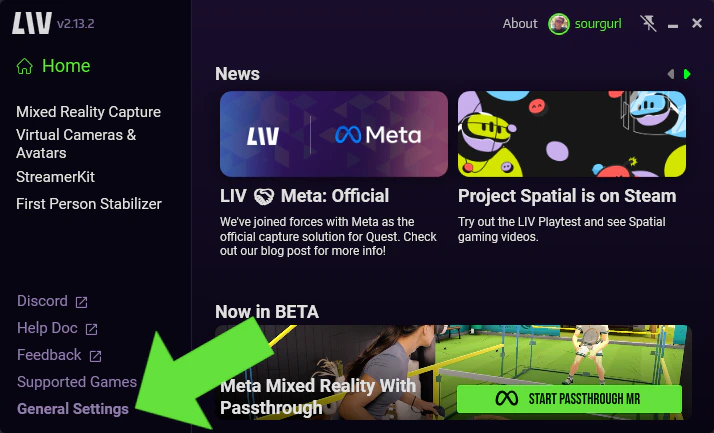
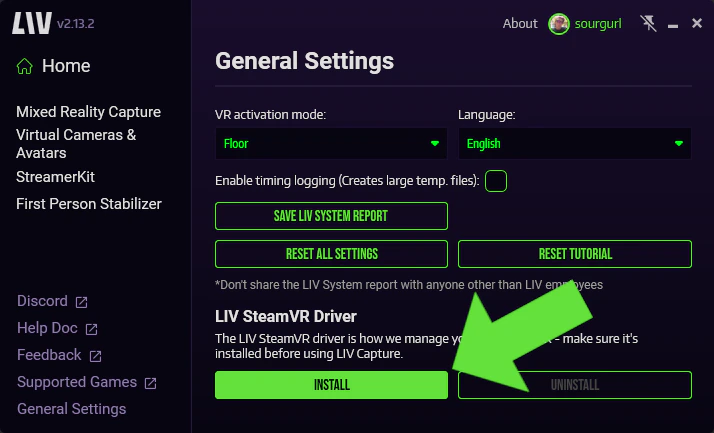
First things first, we need to get your PC environment ready for LIV.Launch LIV and navigate to General Settings (bottom left).Next you will click Install under LIV SteamVR DriverDon’t forget to restart SteamVR after!
Was this page helpful?
{"docsConfig":{"theme":"mint","$schema":"https://mintlify.com/docs.json","name":"LIV Creator Documentation","description":"LIV Hub, LIV Camera, and LIV SteamVR app support","colors":{"primary":"#16A34A","light":"#07C983","dark":"#0F1010"},"logo":{"light":"https://mintcdn.com/liv-creators/HMPxFiX3Sh35PVht/logo/light.svg?fit=max\u0026auto=format\u0026n=HMPxFiX3Sh35PVht\u0026q=85\u0026s=e285ddf6db91f35d416f06ac03f6751b","dark":"https://mintcdn.com/liv-creators/HMPxFiX3Sh35PVht/logo/dark.svg?fit=max\u0026auto=format\u0026n=HMPxFiX3Sh35PVht\u0026q=85\u0026s=8c34aabcf559f33b42ff5a0788bb3334"},"favicon":"/favicon.png","background":{"color":{"dark":"#0F1010"}},"navbar":{"links":[],"primary":{"type":"button","label":"Dashboard","href":"https://dashboard.liv.tv/dev/login"}},"footer":{"socials":{"x":"https://twitter.com/LIV","youtube":"https://www.youtube.com/@liv","instagram":"https://www.instagram.com/liv","bluesky":"https://bsky.app/profile/liv.tv","discord":"https://liv.tv/discord","website":"https://liv.tv"}},"seo":{"indexing":"navigable"},"contextual":{"options":["copy","view","chatgpt","claude","perplexity","mcp","cursor","vscode"],"display":"header"},"styling":{"latex":false},"navigation":{"global":{"anchors":[{"anchor":"LIV Hub","icon":"vr-cardboard","href":"https://www.meta.com/en-gb/experiences/24199129276346881/"},{"anchor":"LIV Discord","icon":"discord","href":"https://discord.com/invite/liv"}]},"pages":[]}},"deployment":{"deploymentMetadataValue":{"subdomain":"liv-creators","hasAudioNarration":false,"actualSubdomain":"liv-creators","customDomains":[],"gitSource":{"type":"github","owner":"liv","repo":"liv-user-help-docs","deployBranch":"main","contentDirectory":"","isPrivate":true,"mountPath":"","label":""},"feedback":{"thumbs":true},"entitlements":{"AI_CHAT":{"status":"ENABLED"},"WEB_MCP":{"status":"ENABLED"},"NARRATION":{"status":"ENABLED"}},"buildId":"6ae94647fc206e01340adcb9:success","clientVersion":"0.0.4286","searchFilterCounts":[{"language":"default","tag":"LIV Steam App on PCVR","count":122},{"language":"default","tag":"Guides","count":98},{"language":"default","tag":"Troubleshooting","count":42},{"language":"default","tag":"LIV Hub and LIV Camera","count":38},{"language":"default","tag":"LIV Avatars and Virtual Cameras","count":31},{"language":"default","tag":"LIV Hub","count":23},{"language":"default","tag":"General LIV Steam App","count":21},{"language":"default","tag":"Mixed Reality","count":19},{"language":"default","tag":"StreamerKit","count":13},{"language":"default","tag":"FAQ","count":12}]},"assistantConfig":{"enableAskAiButton":false,"enableStarterQuestions":false,"enableAskAiSearchBar":true},"basePath":"","hasChatPermissions":true,"hasWebMcpPermissions":true,"toggles":[{"name":"kill-isr","enabled":true,"variant":{"name":"disabled","enabled":false,"feature_enabled":true},"impressionData":false},{"name":"custom-rbac-roles","enabled":true,"variant":{"name":"disabled","enabled":false,"feature_enabled":true},"impressionData":false},{"name":"agent-mintlify-slack","enabled":true,"variant":{"name":"disabled","enabled":false,"feature_enabled":true},"impressionData":false},{"name":"agent-integrations-settings","enabled":true,"variant":{"name":"disabled","enabled":false,"feature_enabled":true},"impressionData":false},{"name":"rbac-expansion","enabled":true,"variant":{"name":"disabled","enabled":false,"feature_enabled":true},"impressionData":false},{"name":"automations-pr-grouping","enabled":true,"variant":{"name":"disabled","enabled":false,"feature_enabled":true},"impressionData":false},{"name":"custom-prefix","enabled":true,"variant":{"name":"disabled","enabled":false,"feature_enabled":true},"impressionData":false},{"name":"analytics-v7","enabled":true,"variant":{"name":"disabled","enabled":false,"feature_enabled":true},"impressionData":false},{"name":"user-flows-analytics","enabled":true,"variant":{"name":"disabled","enabled":false,"feature_enabled":true},"impressionData":false},{"name":"no-publish-flow","enabled":true,"variant":{"name":"disabled","enabled":false,"feature_enabled":true},"impressionData":false},{"name":"workos-onboarding","enabled":true,"variant":{"name":"disabled","enabled":false,"feature_enabled":true},"impressionData":false},{"name":"snapshot-serving-live","enabled":true,"variant":{"name":"disabled","enabled":false,"feature_enabled":true},"impressionData":false},{"name":"stripTemperatureMiddleware","enabled":true,"variant":{"name":"disabled","enabled":false,"feature_enabled":true},"impressionData":false},{"name":"support-platform-pylon-zendesk","enabled":true,"variant":{"name":"disabled","enabled":false,"feature_enabled":true},"impressionData":false},{"name":"snapshot-serving","enabled":true,"variant":{"name":"disabled","enabled":false,"feature_enabled":true},"impressionData":false},{"name":"instant-rollback","enabled":true,"variant":{"name":"disabled","enabled":false,"feature_enabled":true},"impressionData":false},{"name":"granular-notifications-server","enabled":true,"variant":{"name":"disabled","enabled":false,"feature_enabled":true},"impressionData":false},{"name":"granular-notifications","enabled":true,"variant":{"name":"disabled","enabled":false,"feature_enabled":true},"impressionData":false},{"name":"automations-fable","enabled":true,"variant":{"name":"disabled","enabled":false,"feature_enabled":true},"impressionData":false},{"name":"fixed-ai-action-pricing","enabled":true,"variant":{"name":"disabled","enabled":false,"feature_enabled":true},"impressionData":false},{"name":"site-roles","enabled":true,"variant":{"name":"disabled","enabled":false,"feature_enabled":true},"impressionData":false},{"name":"automation-resolve-merge-conflict","enabled":true,"variant":{"name":"disabled","enabled":false,"feature_enabled":true},"impressionData":false},{"name":"scoped-publishing","enabled":true,"variant":{"name":"disabled","enabled":false,"feature_enabled":true},"impressionData":false},{"name":"mintql","enabled":true,"variant":{"name":"disabled","enabled":false,"feature_enabled":true},"impressionData":false},{"name":"page-level-analytics","enabled":true,"variant":{"name":"disabled","enabled":false,"feature_enabled":true},"impressionData":false},{"name":"editor-version-history-v2","enabled":true,"variant":{"name":"disabled","enabled":false,"feature_enabled":true},"impressionData":false},{"name":"billing-page-v2","enabled":true,"variant":{"name":"disabled","enabled":false,"feature_enabled":true},"impressionData":false},{"name":"full-page-search","enabled":true,"variant":{"name":"disabled","enabled":false,"feature_enabled":true},"impressionData":false},{"name":"workspace-projects","enabled":true,"variant":{"name":"disabled","enabled":false,"feature_enabled":true},"impressionData":false},{"name":"assistant-v5","enabled":true,"variant":{"name":"disabled","enabled":false,"feature_enabled":true},"impressionData":false},{"name":"fork-pr-previews","enabled":true,"variant":{"name":"disabled","enabled":false,"feature_enabled":true},"impressionData":false},{"name":"revalidation-jwt","enabled":true,"variant":{"name":"disabled","enabled":false,"feature_enabled":true},"impressionData":false},{"name":"workos-sso-scim","enabled":true,"variant":{"name":"disabled","enabled":false,"feature_enabled":true},"impressionData":false},{"name":"hobby-abuse-scan","enabled":true,"variant":{"name":"disabled","enabled":false,"feature_enabled":true},"impressionData":false},{"name":"dashboard-inbox","enabled":true,"variant":{"name":"disabled","enabled":false,"feature_enabled":true},"impressionData":false},{"name":"workos-signup","enabled":true,"variant":{"name":"disabled","enabled":false,"feature_enabled":true},"impressionData":false},{"name":"turbopuffer-dual-write","enabled":true,"variant":{"name":"disabled","enabled":false,"feature_enabled":true},"impressionData":false},{"name":"workos-enabled","enabled":true,"variant":{"name":"disabled","enabled":false,"feature_enabled":true},"impressionData":false},{"name":"approve-review-flow","enabled":true,"variant":{"name":"disabled","enabled":false,"feature_enabled":true},"impressionData":false},{"name":"editor-metadata","enabled":true,"variant":{"name":"disabled","enabled":false,"feature_enabled":true},"impressionData":false},{"name":"sso-setup-deadline-banner","enabled":true,"variant":{"name":"disabled","enabled":false,"feature_enabled":true},"impressionData":false},{"name":"turbopuffer-serve","enabled":true,"variant":{"name":"disabled","enabled":false,"feature_enabled":true},"impressionData":false},{"name":"live-agents","enabled":true,"variant":{"name":"disabled","enabled":false,"feature_enabled":true},"impressionData":false},{"name":"starter-pricing","enabled":true,"variant":{"name":"control","enabled":true,"payload":{"type":"string","value":"control"},"feature_enabled":true},"impressionData":false},{"name":"llms-txt-v2","enabled":true,"variant":{"name":"disabled","enabled":false,"feature_enabled":true},"impressionData":false},{"name":"wildcard-email-auth","enabled":true,"variant":{"name":"disabled","enabled":false,"feature_enabled":true},"impressionData":false}],"googleFontsInlined":false},"customCss":[]}
{"page":{"pagePath":"liv-steam-app-on-pcvr/guides/mixed-reality/steamvr-driver","slug":"/liv-steam-app-on-pcvr/guides/mixed-reality/steamvr-driver","pageMetadata":{"title":"1. Install LIV's SteamVR driver","description":null,"href":"/liv-steam-app-on-pcvr/guides/mixed-reality/steamvr-driver","hidden":false},"pageType":"default","mdx":{"mdxSource":{"compiledSource":"\"use strict\";const{Fragment:_Fragment,jsx:_jsx,jsxs:_jsxs}=arguments[0];const{useMDXComponents:_provideComponents}=arguments[0];function _createMdxContent(props){const _components={p:`p`,..._provideComponents(),...props.components},{OptimizedImage}=_components;if(!OptimizedImage)_missingMdxReference(`OptimizedImage`,true);return _jsxs(_Fragment,{children:[_jsx(_components.p,{children:`First things first, we need to get your PC environment ready for LIV.`}),`\n`,_jsx(_components.p,{children:`Launch LIV and navigate to General Settings (bottom left).`}),`\n`,_jsx(OptimizedImage,{src:`https://mintcdn.com/liv-creators/hC072u2GXg8WNL5g/images/livsteamapp/GS.png?fit=max\u0026auto=format\u0026n=hC072u2GXg8WNL5g\u0026q=85\u0026s=2530b75ab341fb4ced72c4603a288e96`,alt:`GS`,\"data-og-width\":`714`,width:`714`,\"data-og-height\":`433`,height:`433`,\"data-path\":`images/livsteamapp/GS.png`,\"data-optimize\":`true`,\"data-opv\":`3`,srcset:`https://mintcdn.com/liv-creators/hC072u2GXg8WNL5g/images/livsteamapp/GS.png?w=280\u0026fit=max\u0026auto=format\u0026n=hC072u2GXg8WNL5g\u0026q=85\u0026s=abee0b3d802859460f2b4506fb658de9 280w, https://mintcdn.com/liv-creators/hC072u2GXg8WNL5g/images/livsteamapp/GS.png?w=560\u0026fit=max\u0026auto=format\u0026n=hC072u2GXg8WNL5g\u0026q=85\u0026s=7392f06e90ea23f8bb9d607057a51ac0 560w, https://mintcdn.com/liv-creators/hC072u2GXg8WNL5g/images/livsteamapp/GS.png?w=840\u0026fit=max\u0026auto=format\u0026n=hC072u2GXg8WNL5g\u0026q=85\u0026s=0a4244a3eb7623867278adb84d700f47 840w, https://mintcdn.com/liv-creators/hC072u2GXg8WNL5g/images/livsteamapp/GS.png?w=1100\u0026fit=max\u0026auto=format\u0026n=hC072u2GXg8WNL5g\u0026q=85\u0026s=e29714574570427249fd269cb24816bc 1100w, https://mintcdn.com/liv-creators/hC072u2GXg8WNL5g/images/livsteamapp/GS.png?w=1650\u0026fit=max\u0026auto=format\u0026n=hC072u2GXg8WNL5g\u0026q=85\u0026s=5b96e6500e25519ef87301c74e36ecfb 1650w, https://mintcdn.com/liv-creators/hC072u2GXg8WNL5g/images/livsteamapp/GS.png?w=2500\u0026fit=max\u0026auto=format\u0026n=hC072u2GXg8WNL5g\u0026q=85\u0026s=426e83e16233fcc0191cbdf44fc9dd4b 2500w`}),`\n`,_jsx(_components.p,{children:`Next you will click Install under LIV SteamVR Driver`}),`\n`,_jsx(OptimizedImage,{src:`https://mintcdn.com/liv-creators/hC072u2GXg8WNL5g/images/livsteamapp/installdriver.png?fit=max\u0026auto=format\u0026n=hC072u2GXg8WNL5g\u0026q=85\u0026s=a665efa88f23008ec4b39112fa2fd4a9`,alt:`Installdriver`,\"data-og-width\":`714`,width:`714`,\"data-og-height\":`433`,height:`433`,\"data-path\":`images/livsteamapp/installdriver.png`,\"data-optimize\":`true`,\"data-opv\":`3`,srcset:`https://mintcdn.com/liv-creators/hC072u2GXg8WNL5g/images/livsteamapp/installdriver.png?w=280\u0026fit=max\u0026auto=format\u0026n=hC072u2GXg8WNL5g\u0026q=85\u0026s=6fc4e2f3de7394b96fdc08fb05494056 280w, https://mintcdn.com/liv-creators/hC072u2GXg8WNL5g/images/livsteamapp/installdriver.png?w=560\u0026fit=max\u0026auto=format\u0026n=hC072u2GXg8WNL5g\u0026q=85\u0026s=c9d3a95f8a863530eb8ee64c6170c7e5 560w, https://mintcdn.com/liv-creators/hC072u2GXg8WNL5g/images/livsteamapp/installdriver.png?w=840\u0026fit=max\u0026auto=format\u0026n=hC072u2GXg8WNL5g\u0026q=85\u0026s=a539c6f2ecc8058c42903142a8161e00 840w, https://mintcdn.com/liv-creators/hC072u2GXg8WNL5g/images/livsteamapp/installdriver.png?w=1100\u0026fit=max\u0026auto=format\u0026n=hC072u2GXg8WNL5g\u0026q=85\u0026s=7e50ac95bb206f93755060c1d16d99a0 1100w, https://mintcdn.com/liv-creators/hC072u2GXg8WNL5g/images/livsteamapp/installdriver.png?w=1650\u0026fit=max\u0026auto=format\u0026n=hC072u2GXg8WNL5g\u0026q=85\u0026s=500aa2fa7d66109d844db1533e8cae4c 1650w, https://mintcdn.com/liv-creators/hC072u2GXg8WNL5g/images/livsteamapp/installdriver.png?w=2500\u0026fit=max\u0026auto=format\u0026n=hC072u2GXg8WNL5g\u0026q=85\u0026s=28c87a78aff938f0dc631c642d9abde9 2500w`}),`\n`,_jsx(_components.p,{children:`Don’t forget to restart SteamVR after!`})]})}function MDXContent(props={}){const{wrapper:MDXLayout}={..._provideComponents(),...props.components};return MDXLayout?_jsx(MDXLayout,{...props,children:_jsx(_createMdxContent,{...props})}):_createMdxContent(props)}return{default:MDXContent};function _missingMdxReference(id,component){throw new Error(`Expected `+(component?`component`:`object`)+\" `\"+id+\"` to be defined: you likely forgot to import, pass, or provide it.\")}","frontmatter":{},"scope":{"config":{},"pageMetadata":{"title":"1. Install LIV's SteamVR driver","description":null,"href":"/liv-steam-app-on-pcvr/guides/mixed-reality/steamvr-driver","hidden":false}}},"mdxSourceWithNoJs":null},"mdxExtracts":{"tableOfContents":[],"codeExamples":{}},"jsLinks":["/_mintlify/custom/liv-creators/b1cda4179d8fd79d/umami-inject.js"],"subdomain":"liv-creators","siteName":"LIV Creator Documentation","title":"1. Install LIV's SteamVR driver - LIV Creator Documentation","navMaps":{"firstHrefInVersion":{},"firstHrefInLanguage":{}},"lastModified":"2026-03-05T17:07:31.445Z","originalFileLocation":"liv-steam-app-on-pcvr/guides/mixed-reality/steamvr-driver.mdx"},"headHtml":"\u003cscript data-mint-head>(function(){var d=document.documentElement,p=null;if(!p){try{p=localStorage.getItem(\"isDarkMode\")}catch(e){}if(p==='true')p='dark';else if(p==='false')p='light';if(p!=='light'\u0026\u0026p!=='dark'\u0026\u0026p!=='system')p=\"system\"}var r=p==='system'?(matchMedia(\"(prefers-color-scheme: dark)\").matches?'dark':'light'):p;d.classList.remove(r==='dark'?'light':'dark');d.classList.add(r);d.setAttribute(\"data-theme-preference\",p)})();\u003c/script>\u003cmeta data-mint-head name=\"application-name\" content=\"LIV Creator Documentation\">\u003cmeta data-mint-head name=\"generator\" content=\"Mintlify\">\u003clink data-mint-head rel=\"icon\" type=\"image/png\" sizes=\"192x192\" href=\"/mintlify-assets/_mintlify/favicons/liv-creators/dKSRcDNPvK-w20Ab/_generated/favicon/android-chrome-192x192.png\" media=\"(prefers-color-scheme: light)\">\u003clink data-mint-head rel=\"apple-touch-icon\" type=\"image/png\" sizes=\"180x180\" href=\"/mintlify-assets/_mintlify/favicons/liv-creators/dKSRcDNPvK-w20Ab/_generated/favicon/apple-touch-icon.png\">\u003clink data-mint-head rel=\"icon\" type=\"image/png\" sizes=\"16x16\" href=\"/mintlify-assets/_mintlify/favicons/liv-creators/dKSRcDNPvK-w20Ab/_generated/favicon/favicon-16x16.png\" media=\"(prefers-color-scheme: light)\">\u003clink data-mint-head rel=\"icon\" type=\"image/png\" sizes=\"32x32\" href=\"/mintlify-assets/_mintlify/favicons/liv-creators/dKSRcDNPvK-w20Ab/_generated/favicon/favicon-32x32.png\" media=\"(prefers-color-scheme: light)\">\u003clink data-mint-head rel=\"shortcut icon\" type=\"image/x-icon\" href=\"/mintlify-assets/_mintlify/favicons/liv-creators/dKSRcDNPvK-w20Ab/_generated/favicon/favicon.ico\" media=\"(prefers-color-scheme: light)\">\u003clink data-mint-head rel=\"icon\" type=\"image/png\" sizes=\"192x192\" href=\"/mintlify-assets/_mintlify/favicons/liv-creators/dKSRcDNPvK-w20Ab/_generated/favicon-dark/android-chrome-192x192.png\" media=\"(prefers-color-scheme: dark)\">\u003clink data-mint-head rel=\"icon\" type=\"image/png\" sizes=\"16x16\" href=\"/mintlify-assets/_mintlify/favicons/liv-creators/dKSRcDNPvK-w20Ab/_generated/favicon-dark/favicon-16x16.png\" media=\"(prefers-color-scheme: dark)\">\u003clink data-mint-head rel=\"icon\" type=\"image/png\" sizes=\"32x32\" href=\"/mintlify-assets/_mintlify/favicons/liv-creators/dKSRcDNPvK-w20Ab/_generated/favicon-dark/favicon-32x32.png\" media=\"(prefers-color-scheme: dark)\">\u003clink data-mint-head rel=\"shortcut icon\" type=\"image/x-icon\" href=\"/mintlify-assets/_mintlify/favicons/liv-creators/dKSRcDNPvK-w20Ab/_generated/favicon-dark/favicon.ico\" media=\"(prefers-color-scheme: dark)\">\u003cmeta data-mint-head property=\"og:title\" content=\"1. Install LIV\u0026#x27;s SteamVR driver - LIV Creator Documentation\">\u003cmeta data-mint-head property=\"og:site_name\" content=\"LIV Creator Documentation\">\u003cmeta data-mint-head property=\"og:url\" content=\"https://liv-creators.mintlify.app/liv-steam-app-on-pcvr/guides/mixed-reality/steamvr-driver\">\u003cmeta data-mint-head property=\"og:type\" content=\"website\">\u003cmeta data-mint-head property=\"og:image\" content=\"https://liv-creators.mintlify.site/_mintlify/api/og/v2?division=Mixed+Reality\u0026amp;title=1.+Install+LIV%27s+SteamVR+driver\u0026amp;theme=abcefa90a372211be90edacf\u0026amp;signature=487af986c99b250ddba4603914c3bdf50ddd61ea83ce0797bab2d51f6eefc745\">\u003cmeta data-mint-head property=\"og:image:width\" content=\"1200\">\u003cmeta data-mint-head property=\"og:image:height\" content=\"630\">\u003cmeta data-mint-head name=\"twitter:card\" content=\"summary_large_image\">\u003cmeta data-mint-head name=\"twitter:title\" content=\"1. Install LIV\u0026#x27;s SteamVR driver - LIV Creator Documentation\">\u003cmeta data-mint-head name=\"twitter:image\" content=\"https://liv-creators.mintlify.site/_mintlify/api/og/v2?division=Mixed+Reality\u0026amp;title=1.+Install+LIV%27s+SteamVR+driver\u0026amp;theme=abcefa90a372211be90edacf\u0026amp;signature=487af986c99b250ddba4603914c3bdf50ddd61ea83ce0797bab2d51f6eefc745\">\u003cmeta data-mint-head name=\"twitter:image:width\" content=\"1200\">\u003cmeta data-mint-head name=\"twitter:image:height\" content=\"630\">\u003cmeta data-mint-head name=\"msapplication-config\" content=\"/mintlify-assets/_mintlify/favicons/liv-creators/dKSRcDNPvK-w20Ab/_generated/favicon/browserconfig.xml\">\u003cmeta data-mint-head name=\"apple-mobile-web-app-title\" content=\"LIV Creator Documentation\">\u003cmeta data-mint-head name=\"msapplication-TileColor\" content=\"#16A34A\">\u003clink data-mint-head rel=\"canonical\" href=\"https://liv-creators.mintlify.app/liv-steam-app-on-pcvr/guides/mixed-reality/steamvr-driver\">\u003clink data-mint-head rel=\"alternate\" type=\"application/xml\" href=\"/sitemap.xml\">\u003clink data-mint-head rel=\"alternate\" type=\"text/markdown\" href=\"/liv-steam-app-on-pcvr/guides/mixed-reality/steamvr-driver.md\">\u003cscript data-mint-head type=\"application/ld+json\">{\"@context\":\"https://schema.org\",\"@graph\":[{\"@type\":\"Organization\",\"@id\":\"https://liv-creators.mintlify.app/#organization\",\"name\":\"LIV Creator Documentation\",\"url\":\"https://liv-creators.mintlify.app\",\"logo\":{\"@type\":\"ImageObject\",\"url\":\"https://mintcdn.com/liv-creators/HMPxFiX3Sh35PVht/logo/light.svg?fit=max\u0026auto=format\u0026n=HMPxFiX3Sh35PVht\u0026q=85\u0026s=e285ddf6db91f35d416f06ac03f6751b\"}},{\"@type\":\"WebSite\",\"@id\":\"https://liv-creators.mintlify.app#website\",\"name\":\"LIV Creator Documentation\",\"url\":\"https://liv-creators.mintlify.app\",\"publisher\":{\"@id\":\"https://liv-creators.mintlify.app/#organization\"}},{\"@type\":\"WebPage\",\"@id\":\"https://liv-creators.mintlify.app/liv-steam-app-on-pcvr/guides/mixed-reality/steamvr-driver#webpage\",\"url\":\"https://liv-creators.mintlify.app/liv-steam-app-on-pcvr/guides/mixed-reality/steamvr-driver\",\"name\":\"1. Install LIV's SteamVR driver\",\"dateModified\":\"2026-03-05T17:07:31.445Z\",\"isPartOf\":{\"@id\":\"https://liv-creators.mintlify.app#website\"},\"breadcrumb\":{\"@id\":\"https://liv-creators.mintlify.app/liv-steam-app-on-pcvr/guides/mixed-reality/steamvr-driver#breadcrumb\"}},{\"@type\":\"BreadcrumbList\",\"@id\":\"https://liv-creators.mintlify.app/liv-steam-app-on-pcvr/guides/mixed-reality/steamvr-driver#breadcrumb\",\"itemListElement\":[{\"@type\":\"ListItem\",\"position\":1,\"name\":\"Mixed Reality\",\"item\":\"https://liv-creators.mintlify.app/liv-steam-app-on-pcvr/guides/mixed-reality/quick-start-guide\"},{\"@type\":\"ListItem\",\"position\":2,\"name\":\"1. Install LIV's SteamVR driver\",\"item\":\"https://liv-creators.mintlify.app/liv-steam-app-on-pcvr/guides/mixed-reality/steamvr-driver\"}]},{\"@type\":[\"Article\",\"TechArticle\"],\"@id\":\"https://liv-creators.mintlify.app/liv-steam-app-on-pcvr/guides/mixed-reality/steamvr-driver#article\",\"headline\":\"1. Install LIV's SteamVR driver\",\"name\":\"1. Install LIV's SteamVR driver\",\"url\":\"https://liv-creators.mintlify.app/liv-steam-app-on-pcvr/guides/mixed-reality/steamvr-driver\",\"mainEntityOfPage\":{\"@id\":\"https://liv-creators.mintlify.app/liv-steam-app-on-pcvr/guides/mixed-reality/steamvr-driver#webpage\"},\"dateModified\":\"2026-03-05T17:07:31.445Z\",\"publisher\":{\"@id\":\"https://liv-creators.mintlify.app/#organization\"},\"isPartOf\":{\"@id\":\"https://liv-creators.mintlify.app#website\"}}]}\u003c/script>\u003cscript data-mint-head type=\"application/ld+json\">{\"@context\":\"https://schema.org\",\"@type\":\"WebSite\",\"name\":\"LIV Creator Documentation\",\"publisher\":{\"@type\":\"Organization\",\"name\":\"LIV Creator Documentation\"},\"provider\":{\"@type\":\"Organization\",\"name\":\"Mintlify\",\"url\":\"https://mintlify.com\"}}\u003c/script>","agentPointerHref":"/liv-steam-app-on-pcvr/guides/mixed-reality/steamvr-driver.md","siteName":"LIV Creator Documentation","nav":{"global":{"anchors":[{"anchor":"LIV Hub","icon":"vr-cardboard","href":"https://www.meta.com/en-gb/experiences/24199129276346881/"},{"anchor":"LIV Discord","icon":"discord","href":"https://discord.com/invite/liv"}]},"products":[{"product":"LIV Hub and LIV Camera","description":"LIV Hub on the Meta Quest","pages":[{"title":"LIV Hub and LIV Camera","href":"/liv-hub-and-liv-camera/home"}]},{"product":"LIV Steam App on PCVR","description":"LIV Steam App","tabs":[{"tab":"Home","pages":[{"title":"Home","href":"/liv-steam-app-on-pcvr/home/what-is-liv-steamvr-app"}]},{"tab":"Guides","groups":[{"group":"Mixed Reality","pages":[{"title":"LIV Mixed Reality Quick Start Guide","description":"Learn to use Mixed Reality in the LIV Steam app","href":"/liv-steam-app-on-pcvr/guides/mixed-reality/quick-start-guide"},{"title":"1. Install LIV's SteamVR driver","href":"/liv-steam-app-on-pcvr/guides/mixed-reality/steamvr-driver"},{"title":"2. Create Mixed Reality Camera Profile","description":null,"href":"/liv-steam-app-on-pcvr/guides/mixed-reality/mr-camera-profile"},{"title":"3. Preparing Your Calibration","href":"/liv-steam-app-on-pcvr/guides/mixed-reality/pre-calibration"},{"title":"4. Calibrating Your Camera","href":"/liv-steam-app-on-pcvr/guides/mixed-reality/camera-calibration"},{"title":"5. Start Capturing (MR)","href":"/liv-steam-app-on-pcvr/guides/mixed-reality/start-capture"},{"group":"Feature guides","pages":[{"title":"Capture Meta Presence Platform with LIV","href":"/liv-steam-app-on-pcvr/guides/mixed-reality/capture-meta-presence-platform"},{"title":"Compositing passthrough capture","href":"/liv-steam-app-on-pcvr/guides/mixed-reality/compositing-passthrough-capture"},{"title":"LIV Meta Presence Platform support","href":"/liv-steam-app-on-pcvr/guides/mixed-reality/meta-presence-platform"},{"title":"Touge's Mixed Reality Post-Production","href":"/liv-steam-app-on-pcvr/guides/mixed-reality/dump-mode-composition"},{"title":"What is De-spill, and how do I use it in LIV?","href":"/liv-steam-app-on-pcvr/guides/mixed-reality/despill-adjustment"},{"title":"Additional Features (MR)","href":"/liv-steam-app-on-pcvr/guides/mixed-reality/feature-guides/additional-mr-features"},{"title":"Setup a Tracked/moveable camera","href":"/liv-steam-app-on-pcvr/guides/mixed-reality/feature-guides/tracked-camera"},{"title":"Minimizing Playspace Drift with Quest Standalone and Lighthouse Tracking","href":"/liv-steam-app-on-pcvr/guides/mixed-reality/minimize-drift"},{"title":"BETA - Mixed Reality without a green screen with Nvidia GPUs","href":"/liv-steam-app-on-pcvr/guides/mixed-reality/mixed-reality-no-green-screen"},{"title":"OpenVR Space Rotation","href":"/liv-steam-app-on-pcvr/guides/mixed-reality/openvr-space-rotation"},{"title":"How To Create a Static Mask","href":"/liv-steam-app-on-pcvr/guides/mixed-reality/create-static-mask"},{"title":"Kinect v2 or Kinect Azure no green screen solution","href":"/liv-steam-app-on-pcvr/guides/mixed-reality/kinect-no-green-screen"}]},{"title":"ragesaqs technique for getting perfect calibration","href":"/liv-steam-app-on-pcvr/guides/mixed-reality/calibration-guide"}]},{"group":"LIV Avatars and Virtual Cameras","pages":[{"title":"Avatar Quick Start Guide","href":"/liv-steam-app-on-pcvr/guides/liv-avatars-and-virtual-cameras/avatar-startup-guide"},{"title":"Install LIV's SteamVR driver","href":"/liv-steam-app-on-pcvr/guides/liv-avatars-and-virtual-cameras/untitled-page"},{"title":"Create Avatar Camera Profile","href":"/liv-steam-app-on-pcvr/guides/liv-avatars-and-virtual-cameras/avatar-camera-profile"},{"title":"Find, Install, and Remove Avatars","href":"/liv-steam-app-on-pcvr/guides/liv-avatars-and-virtual-cameras/manage-avatars"},{"title":"Enter the LIV Avatar Interface","href":"/liv-steam-app-on-pcvr/guides/liv-avatars-and-virtual-cameras/avatar-interface"},{"title":"Avatar Configuration","href":"/liv-steam-app-on-pcvr/guides/liv-avatars-and-virtual-cameras/avatar-configuration"},{"title":"Start Capturing (Avatar)","href":"/liv-steam-app-on-pcvr/guides/liv-avatars-and-virtual-cameras/capturing-avatar"},{"title":"How to Use LIV: Avatars (Video)","href":"/liv-steam-app-on-pcvr/guides/liv-avatars-and-virtual-cameras/how-to-liv-avatars"},{"title":"Camera Modes","href":"/liv-steam-app-on-pcvr/guides/liv-avatars-and-virtual-cameras/camera-modes"},{"title":"Overlay Indicator","href":"/liv-steam-app-on-pcvr/guides/liv-avatars-and-virtual-cameras/overlay-indicator"},{"title":"The Viewfinder","href":"/liv-steam-app-on-pcvr/guides/liv-avatars-and-virtual-cameras/viewfinder"},{"title":"LIV's Enhanced FPV","href":"/liv-steam-app-on-pcvr/guides/liv-avatars-and-virtual-cameras/enhanced-fpv"},{"title":"Dynamic lighting","href":"/liv-steam-app-on-pcvr/guides/liv-avatars-and-virtual-cameras/dynamic-lighting"},{"title":"Pairing and assigning trackers for Full Body Tracking or tracked camera","href":"/liv-steam-app-on-pcvr/guides/liv-avatars-and-virtual-cameras/pairing-trackers"},{"title":"Avatar best practices","href":"/liv-steam-app-on-pcvr/guides/liv-avatars-and-virtual-cameras/avatar-best-practices"},{"title":"LIV Camera Plugins","href":"/liv-steam-app-on-pcvr/guides/liv-avatars-and-virtual-cameras/camera-plugins"},{"title":"Microphone, Face, and Eye tracking support on .avatar format","href":"/liv-steam-app-on-pcvr/guides/liv-avatars-and-virtual-cameras/mic-face-eye-tracking"},{"title":"Microphone, Face, and Eye tracking support on VRM format","href":"/liv-steam-app-on-pcvr/guides/liv-avatars-and-virtual-cameras/mic-face-eye-tracking-vrm"},{"title":"VRCFT Support in LIV","href":"/liv-steam-app-on-pcvr/guides/liv-avatars-and-virtual-cameras/vrcft"},{"title":"Camera 2 in the LIV Avatar Suite","href":"/liv-steam-app-on-pcvr/guides/liv-avatars-and-virtual-cameras/camera2capture"},{"title":"Close Avatar Hands","href":"/liv-steam-app-on-pcvr/guides/liv-avatars-and-virtual-cameras/avatarclosehands"},{"title":"Disable keyboard privacy in SteamVR","href":"/liv-steam-app-on-pcvr/guides/liv-avatars-and-virtual-cameras/keyboard-privacy"},{"title":"Responsive Smoothing | Roll Lock","href":"/liv-steam-app-on-pcvr/guides/liv-avatars-and-virtual-cameras/roll-lock"},{"title":"Use Game Camera - Avatar","href":"/liv-steam-app-on-pcvr/guides/liv-avatars-and-virtual-cameras/use-game-camera"},{"title":"Use LIV Avatars as an overlay only","href":"/liv-steam-app-on-pcvr/guides/liv-avatars-and-virtual-cameras/avatar-overlay"},{"title":"Does LIV Avatar support button activated facial expressions/animations?","href":"/liv-steam-app-on-pcvr/guides/liv-avatars-and-virtual-cameras/button-activated-expressions"}]},{"group":"StreamerKit","pages":[{"title":"LIV StreamerKit","href":"/liv-steam-app-on-pcvr/guides/streamerkit/streamerkit"},{"title":"Twitch Chat in VR","href":"/liv-steam-app-on-pcvr/guides/streamerkit/twitch-chat"},{"title":"We request the following permissions from Twitch","href":"/liv-steam-app-on-pcvr/guides/streamerkit/twitch-permissions"},{"title":"YouTube Chat in VR","href":"/liv-steam-app-on-pcvr/guides/streamerkit/youtube-chat-in-pcvr"},{"title":"StreamerKit Presets and Profiles","href":"/liv-steam-app-on-pcvr/guides/streamerkit/streamerkit-presets"},{"title":"Streamlabs Alerts in LIV","href":"/liv-steam-app-on-pcvr/guides/streamerkit/streamlab-alerts"},{"title":"StreamerKit Discord bot","href":"/liv-steam-app-on-pcvr/guides/streamerkit/streamerkit-discord-bot"},{"title":"Pulsoid Heart Rate Streaming","href":"/liv-steam-app-on-pcvr/guides/streamerkit/pulsoid-heart-rate"}]},{"group":"First-Person Stabilizer","pages":[{"title":"First-Person Stabilizer Setup","href":"/liv-steam-app-on-pcvr/guides/first-person-stabilizer/first-person-stabilizer-set-up"},{"title":"Experimental OpenXR support for First Person Stabilizer","href":"/liv-steam-app-on-pcvr/guides/first-person-stabilizer/openxr-support"}]},{"group":"General LIV Steam App","pages":[{"title":"General Settings","href":"/liv-steam-app-on-pcvr/guides/general-liv-steam-app/general-settings"},{"title":"How To Improve Performance With LIV","href":"/liv-steam-app-on-pcvr/guides/general-liv-steam-app/improve-performance"},{"title":"How to use your Meta Quest with LIV","href":"/liv-steam-app-on-pcvr/guides/general-liv-steam-app/meta-quest-with-liv"},{"title":"Virtual Desktop OpenXR runtime must be set to SteamVR","href":"/liv-steam-app-on-pcvr/guides/general-liv-steam-app/virtual-desktop-openxr-runtime"},{"title":"How to manually capture a game","href":"/liv-steam-app-on-pcvr/guides/general-liv-steam-app/manually-capture-a-game"},{"title":"How to properly start LIV with Virtual Desktop","href":"/liv-steam-app-on-pcvr/guides/general-liv-steam-app/virtual-desktop-start-order"},{"title":"How to remove the watermark","href":"/liv-steam-app-on-pcvr/guides/general-liv-steam-app/remove-watermark"},{"title":"LIV Menu Activation Mode","href":"/liv-steam-app-on-pcvr/guides/general-liv-steam-app/activation-menu"},{"title":"How To stream LIV on Discord with Audio","href":"/liv-steam-app-on-pcvr/guides/general-liv-steam-app/discord-stream"},{"title":"Tracker power up sequence","href":"/liv-steam-app-on-pcvr/guides/general-liv-steam-app/tracker-power-up"},{"title":"How to optimally capture LIV","href":"/liv-steam-app-on-pcvr/guides/general-liv-steam-app/record-liv-capture"},{"title":"Reset all Settings","href":"/liv-steam-app-on-pcvr/guides/general-liv-steam-app/reset-all-settings"},{"title":"Audio latency","href":"/liv-steam-app-on-pcvr/guides/general-liv-steam-app/audio-latency"},{"title":"Echo's PCVR Performance \u0026 Tracking Ultimate Guide","href":"/liv-steam-app-on-pcvr/guides/general-liv-steam-app/pcvr-performance-and-tracking-guide"},{"title":"Rotatoexpress","href":"/liv-steam-app-on-pcvr/guides/general-liv-steam-app/rotatoexpress"},{"title":"How to set SteamVR as your OpenXR Runtime","href":"/liv-steam-app-on-pcvr/guides/general-liv-steam-app/steamvr-openxr-runtime"},{"title":"How to pair SteamVR devices to avoid binding conflicts","href":"/liv-steam-app-on-pcvr/guides/general-liv-steam-app/pair-steamvr-devices"},{"title":"URI Commands for LIV PCVR Camera","href":"/liv-steam-app-on-pcvr/guides/general-liv-steam-app/uri-camera-commans"},{"title":"How To Switch LIV Branch on Steam","href":"/liv-steam-app-on-pcvr/guides/general-liv-steam-app/steam-branch"},{"title":"OBS Plugin","href":"/liv-steam-app-on-pcvr/guides/general-liv-steam-app/obs-plugin"},{"title":"How To verify LIV's Contents in Steam","href":"/liv-steam-app-on-pcvr/guides/general-liv-steam-app/verify-liv-contents-in-steam"}]},{"group":"LIV Profiles","pages":[{"title":"LIV Profiles","href":"/liv-profiles"}]}]},{"tab":"Troubleshooting","pages":[{"title":"Troubleshooting","href":"/liv-steam-app-on-pcvr/troubleshooting/general-troubleshooting/tracker-not-used"}]},{"tab":"FAQ","pages":[{"title":"FAQ","href":"/liv-steam-app-on-pcvr/faq/free-liv"}]}]}]},"basePath":"","title":"1. Install LIV's SteamVR driver - LIV Creator Documentation","deploymentId":"dpl_G6E2ur2Zjq51xGTVZPSFXsWoTxCu","buildId":"dpl_G6E2ur2Zjq51xGTVZPSFXsWoTxCu","dynamics":["a74be98ba7"],"chunks":["zoom-image-lightbox-D1ofL3wq.js","lightbox-handle-r17bVUz3.js"]}